agentic ragAIRAG
Agentic RAG: Building Multi-Agent Search Systems with LangChain
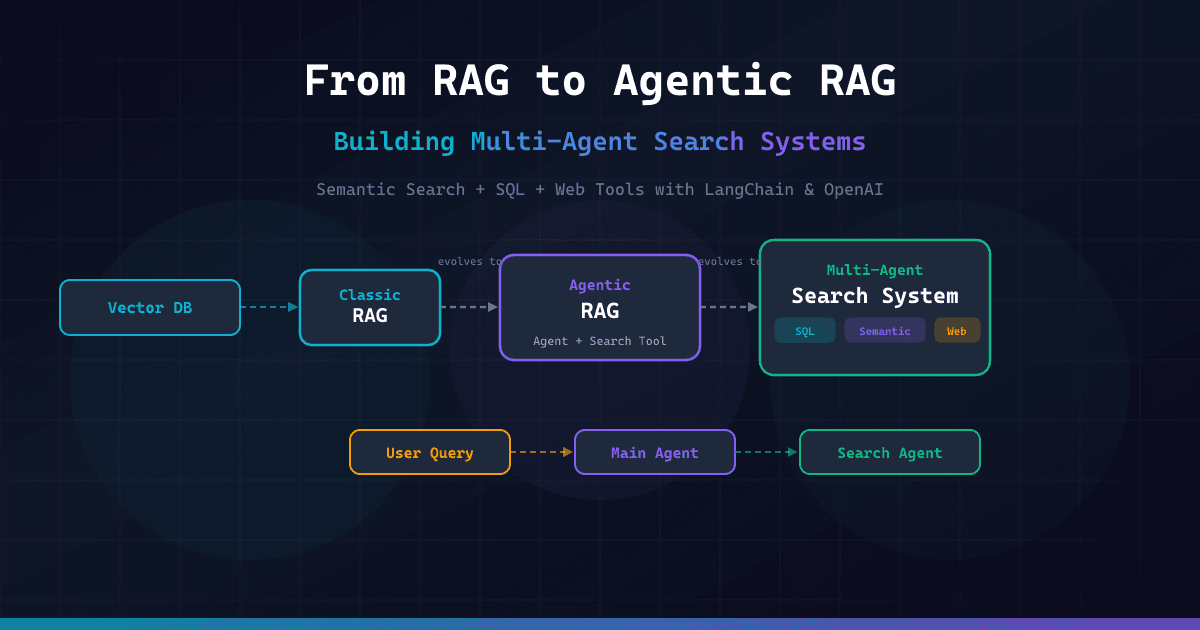
- Agentic RAG goes beyond static retrieval, allowing AI agents to dynamically query, reformulate, and delegate searches to tools like SQL and web search.
- Multi-Agent Systems boost accuracy by separating an Orchestrator (Main Agent) from Specialized Workers (Search Agents).
- Classic RAG retrieves fixed vector chunks, while Agentic RAG uses reasoning to decide when to search and what to retrieve.
🎯 Introduction
While Agentic RAG (Retrieval-Augmented Generation) is the hot new term in AI infrastructure, the problem it solves is real and critical. Classic RAG fits like a glove for answering questions about a static Knowledge Base (PDFs, documentation), but it fails silently when the answer requires dynamic data, complex SQL queries, or cross-referencing real-world traffic.
If you are trying to build a system that answers "What are our sales today?" or "How do Open source frameworks compare right now?", you can't just vectorize the data and ask an LLM. You need a system that can act. In this guide, we will transform a basic RAG pipeline into a robust Multi-Agent Search System using Python, LangChain, and OpenAI.
🧠 Core Explanation
The evolution of search systems in LLM architecture generally follows a linear trajectory:
- Retrieval-Augmented Generation (The Basis): You dump documents into a Vector Store. When a user asks a question, you retrieve the top K most similar chunks and feed them to the LLM with a prompt.
- Limitation: It assumes the answer is equally relevant across all documents and doesn't know how to find that answer if it's not explicitly text-similar.
- Agentic RAG (The Reasoner): You give the LLM access to tools (Browsers, SQL DB, Analytics tools). The LLM decides if it needs information.
- Limitation: A general-purpose LLM (like GPT-3.5 or even GPT-4) is "jack of all trades, master of none." Trying to make it a database expert, a web-scraping expert, and a summarizer in one prompt often leads to noise and hallucinations.
- Multi-Agent Search System (The Specialist): You separate the roles.
- Main Agent (Orchestrator): The generalist. It knows the user's intent.
- Search Agent (Specialist): The expert. It holds the access to specific tools. If the Main Agent needs data, it delegates to the Search Agent.
🔥 Contrarian Insight
Most tutorials hype up "adding tools" to agents as the silver bullet for RAG accuracy. I disagree.
Giving a bored System Instruction to an LLM and expecting it to use tools flawlessly is a recipe for chaos. The "Real World" problem isn't the model's ability to code; it's the State Management. Without a strict token budget and a defined failure mode, your agent will chain 20 tools together, infinite-looping until it hits the context limit.
Agentic RAG isn't just about giving the agent a search engine; it's about strict Workflow Orchestration.
🔍 Deep Dive / Details
The Architecture Decision
To move from RAG to Multi-Agent, we must resolve two blocking issues in production:
- The "Right Tool" Problem: You rarely want the LLM to query a database directly unless you are certain the prompt will stay valid. You want the LLM to generate the search query while the database connection stays safely abstracted.
- Context Sustainability: If the Agent tries to scrape the whole web or read 500 pages of logs, it burns your budget and context window immediately.
The Solution: The Delegate-to-Agent Pattern
We will build a system where:
- The Main Agent receives a question like "How did our Q3 sales perform compared to this month?"
- It analyzes its internal knowledge (vector store).
- It recognizes it lacks current data.
- It invokes a Search Agent with a specific prompt: "Use tools to find the sales numbers for this month and compare them to the library's historical data."
🧑💻 Practical Value: How to Build This
Below is a production-style implementation (Python). We will use LangGraph (conceptually) or LangChain AgentExecutor logic to orchestrate this.
Prerequisites
pip install langchain langchain-openai chromadb duckduckgo-search_httpx beautifulsoup4
1. The Tools
We need three distinct capabilities:
- Semantic Search Tool: Looks through our company docs (ChromaDB).
- SQL Tool: Connects to a local SQLite DB for structured data.
- Web Search Tool: For current events or external info.
from langchain.agents import Tool, AgentExecutor, create_openai_functions_agent
from langchain_openai import ChatOpenAI
from langchain_core.prompts import ChatPromptTemplate
import chromadb
from chromadb.utils import embedding_functions

# --- 1. Vector Store (Docs) ---
openai_embedding_function = embedding_functions.OpenAIEmbeddingFunction(api_key="YOUR_KEY")
client = chromadb.PersistentClient(path="./db")
collection = client.get_or_create_collection("company_docs", embedding_function=openai_embedding_function)

def semantic_search(query: str):
    results = collection.query(query_texts=[query], n_results=3)
    return "\n".join([doc for doc in results['documents'][0]])

# --- 2. SQL Tool ---
import sqlite3
conn = sqlite3.connect(":memory:") # In prod, this is your DB
# Create dummy data
conn.execute("CREATE TABLE sales (month TEXT, revenue REAL)")
conn.execute("INSERT INTO sales VALUES ('Q3', 50000)")
conn.execute("INSERT INTO sales VALUES ('2023-10', 15000)")
conn.execute("INSERT INTO sales VALUES ('2023-11', 16000)")
conn.commit()

def run_sql(query: str):
    try:
        cursor = conn.cursor()
        cursor.execute(query)
        return str(cursor.fetchall())
    except Exception as e:
        return f"SQL Error: {e}"

# --- 3. Web Search Tool ---
def web_search_tool(query: str):
    # In a real app, this wraps Bing Search API or DuckDuckGo
    return "Web search result: 10k visitors today (simulated scrape)"

# Define the Tools List
tools = [
    Tool(name="Semantic_Search", func=semantic_search, description="Search internal docs."),
    Tool(name="SQL_DB", func=run_sql, description="Query structured sales data using SQL syntax."),
    Tool(name="Web_Search", func=web_search_tool, description="Fetch live web data.")
]
2. The Agents
We need specialized prompts.
The Main Agent (Orchestrator)
- It cares about the user's request.
- It decides: "Do I know this? If not, should I ask Search Agent?"
The Search Agent (Worker)
- It wraps the
tools. - It is explicitly forbidden from "hallucinating."
llm = ChatOpenAI(model="gpt-3.5-turbo-0125", temperature=0)

# The Main Agent Prompt
main_prompt = ChatPromptTemplate.from_messages([
    ("system", "You are a Senior Project Manager. You answer questions based on internal knowledge first. If you don't know the answer, identify that gap clearly."),
    ("human", "{input}")
])

# The Search Agent Prompt
search_prompt = ChatPromptTemplate.from_messages([
    ("system", "You are a Data Analyst. You must use the 'SQL_DB' or 'Web_Search' tools to gather facts. Do not make up numbers."),
    ("human", "Here is the master question: {instruction}. Analyze it and use the right tool to gather the specific data points needed.")
])

# 1. Create the Main Agent
main_agent = create_openai_functions_agent(
    llm=llm,
    tools=[], # Main agent usually has no tools, just logic
    prompt=main_prompt
)
main_executor = AgentExecutor(agent=main_agent, tools=[], verbose=True)

# 2. Create the Search Agent (Wraps all tools)
search_agent = create_openai_functions_agent(
    llm=llm,
    tools=tools,
    prompt=search_prompt
)
search_executor = AgentExecutor(agent=search_agent, tools=tools, verbose=True)
3. The Orchestration Loop (The "Magic")
This is where we implement the Multi-Agent thinking.
def run_multi_agent_system(user_question: str):
    print(f"--- Main Agent Thinking: {user_question} ---")

    # Step A: Main Agent attempts to answer from internal memory
    inner_thoughts = main_agent.invoke({"input": user_question})

    # Check if Main Agent hit a knowledge gap (Heuristic check: if it knows, return early)
    if "I don't know" not in inner_thoughts['output'] and "internal knowledge" in inner_thoughts['output'].lower():
        return inner_thoughts['output']

    # Step B: Knowledge Gap Detected - Delegation!
    print("--- Delegating to Search Agent ---")

    # We generate a sub-task for the search agent based on what the Main Agent was asked
    delegation_task = f"Use Semantic_Search, SQL, and Web_Search tools to find: {user_question}"

    search_result = search_agent.invoke({"instruction": delegation_task})

    # Step C: Synthesis
    final_answer = f"Based on gathered data: {search_result['output']}"
    return final_answer

# Test
print(run_multi_agent_system("What were our Q3 sales compared to this month?"))
Key Production Tip: In a larger system, you would not manually code this loop. You would use LangGraph or AutoGen. These frameworks manage the state transitions automatically so the agents can "talk" to each other (Main → Search → Main).
⚔️ Comparison Section
| Feature | Classic RAG | Agentic RAG | Multi-Agent Search |
|---|---|---|---|
| Architecture | Retrieval Only | LLM + Tools | Orchestrator + Workers |
| Data Source | Vector DB only | Vector DB, API, SQL | Distributed (DB, Web, Vector) |
| Reasoning | None | Single-Loop Reasoning | Multi-Step Planning |
| Hallucination | High (if chunk mismatch) | Medium (RAG fix) | Low (Specialized agents) |
| Latency | Low | Medium | High (Network hops) |
⚡ Key Takeaways
- RAG limits static context: Basic vector search cannot answer "What is the weather forecast?" or "How many intangible assets do we have today regarding coding standards?"
- Agents add cost: Every tool invocation (Web Search, SQL Query) costs Token Count. Never let an agent loop infinitely.
- Specialization beats generalization: A generic LLM searching a schema is error-prone. A dedicated agent bound to SQL tools is reliable.
- The Multi-Agent pattern is the standard for LLM systems managing complex, multi-source data pipelines.
🔗 Related Topics
- LangGraph: Building Stateful AI Agents
- Pinecone vs ChromaDB: Which Vector DB for a Startup?
- Prompt Engineering for RAG: Context Window Management
🔮 Future Scope
The next step beyond "Agentic RAG" is Self-Refining Agentic RAG. In this state, the Main Agent produces an answer, but the Search Agent analyzes it for accuracy, and if there's a gap, it posts a question back to the Main Agent for clarification before answering the user.
❓ FAQ
Q: Is Agentic RAG slower than standard RAG? A: Yes, significantly. Multi-Agent systems involve network calls (Web) and multiple LLM inferences. You must optimize for speed via caching if you use this for real-time chat.
Q: Can I use Local LLMs (Llama 3) instead of OpenAI? A: Absolutely. The code above works perfectly with Ollama or HuggingFace models. The "Agentic" logic remains the same; only the generation engine changes.
Q: Do I need a database schema for the agents? A: If your data is semi-structured (JSON, SQL), yes. If purely unstructured text, a Semantic RAG is sufficient, but you might still need a Web Agent for updates.
🎯 Conclusion
Transitioning from Agentic RAG to Multi-Agent Search is about outsourcing intelligence. By treating your LLM not as a calculator, but as a manager, you can build systems that are accurate, dynamic, and resilient to hallucinations.
Ready to build your first Orchestration Layer? Start by implementing the Main Agent logic using the snippet above, and deploy a simple chat interface to see the delegation in action.
Share This Bit