ChatbotAI
Building a PDF Chatbot: The Technical Blueprint Behind RAG
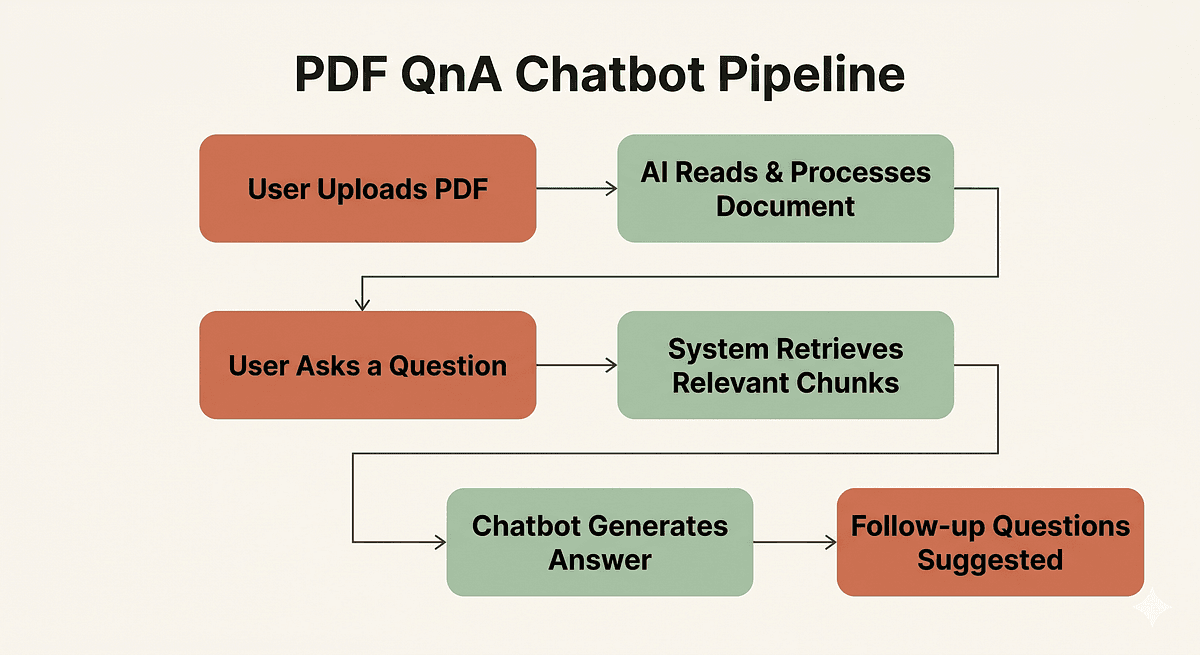
🚀 Quick Answer
- A PDF chatbot uses Natural Language Processing to read documents and answer questions using Retrieval-Augmented Generation (RAG).
- It converts text into vectors (embeddings) and stores them in a vector database for fast semantic search.
- Key steps include OCR (for images), chunking text, and matching user queries to relevant document sections.
- Unlike basic bots, a PDF chatbot reads your data, not a generic database, ensuring hallucination-free accuracy.
🎯 Introduction
Building a PDF chatbot isn't magic; it's a systematic application of Natural Language Processing (NLP). Whether you are trying to automate document reading or understand how tools like ChatGPT parse data, the core logic remains the same: how a PDF chatbot indexes information and answers questions.
In this guide, we strip away the hype to show you the exact architecture developers use at companies like Perplexity and Google. We will break down the six-step pipeline—from OCR to RAG—that transforms a static 40-page PDF into a fluent, interactive question-answering system.
🧠 Core Explanation: Why Machines Struggle to "Read"
To a user, a PDF on ethical hacking is a stream of knowledge: the concept of "penetration testing" connects to "simulated cyberattacks."
To a computer, a PDF (before processing) is just a raw stream of characters: no meaning, no structure, and no relationships between words. The gap between "text characters" and "meaning" is the problem we solve. We need a bridge.
This is where NLP comes in.
- Tokenization: We break language into mathematical units.
- Semantics: We map meaning to numerical space.
- Retrieval: We search for meaning, not keywords.
🔥 Contrarian Insight
"Chunking is harder than the LLM. Most developers spend 80% of their time fine-tuning the embedding model, but the answer is usually compromised by a bad chunking strategy."
In my experience, making a document "askable" is not an NLP problem; it's a data structuring problem. If you split a 40-page report into non-overlapping blocks, you cut sentences in half or separate a core idea from its conclusion, destroying accuracy. Overlap is your best friend.
🔍 Deep Dive: The 6-Step PDF Chatbot Pipeline
Here is the architectural blueprint of how the system works, analyzed for technical depth.
1. OCR: Giving the Machine Eyes
Target: Scanned PDFs (Images only).
Before a machine can understand text, it must extract it. For digital PDFs, NLP libraries can read the text stream directly. For scanned PDFs, we use Optical Character Recognition (OCR).
- How it works: Libraries like Tesseract perform image processing to detect text glyphs and convert them into pixel-free character streams.
- The Trade-off: Poor scanning quality (low resolution, ink smudging) results in hallucinated characters during OCR, which ruins downstream NLP tasks.
2. Tokenization: Breaking Language into Math
Target: Preparing text for LLMs.
Modern Large Language Models (LLMs) don't process English words; they process tokens—sub-words or characters mathematically identified as meaningful bundles.
- Action: The raw ASCII text feed is converted into an integer list (e.g., "Hello" → [3904, 102]).
- Critical Insight: This is why text length limits exist. If a document is too long, it gets truncated during tokenization, losing the beginning or end of a chapter.
3. Chunking: Dividing to Conquer
Target: Managing Context Windows.
LLMs have a hard limit on input size (context window). We must split the document into smaller, manageable pieces.
- Chunk Size: Typically 500 to 1,000 tokens (approx. 300–750 words).
- Chunk Overlap: Crucial. We usually add 10–20% overlap between chunks. This ensures that a sentence sitting exactly on the boundary belongs to both context windows.
- Metadata Tagging: We must tag each chunk with its source (e.g., "Page 12"). This is how the bot can say, "Answer found on Page 12."
4. Semantic Embeddings: Meaning in Numbers
Target: The Vector Store.
This is the heart of the system. We convert every chunk into a vector embedding using a Transformer-based model (like BERT or GPT-2).
- Concept: Think of every chunk as a dot in a high-dimensional space. If document A and document B mean the same thing, their dots are mathematically close, even if they use totally different words.
- The Engine: Models like OpenAI's
text-embedding-3-smallor Open SourceBGE-M3are standard for this.
5. Similarity Search: Eco-system of Similarity
Target: Finding the answer.
When a user asks "How do hackers break in?", we generate an embedding for that question. We then compare it to our stored document embeddings.
- The Metric: Cosine Similarity. We measure the angle between the two vectors.
- The Tech: We store these vectors in a Vector Database like FAISS, Pinecone, Qdrant, or ChromaDB.
- The Result: The system retrieves the top 3 chunks most semantically relevant to the user's question.
6. Retrieval-Augmented Generation: The LLM's Role
Target: Generating the final answer.
Now we have the "best confirmed facts" (the retrieved chunks) and the "user's voice" (the question).
- The Prompt: "Use the following text to answer the user's question: [RETRIEVED CHUNKS]. Question: [USER QUERY]."
- Why it matters: This groundings the LLM. It cannot invent information; it can only reuse what we found in the vector search. This is RAG.
🏗️ System Design: Architecture for Developers
If we were building this for production, this is the workflow we would implement using Python and LangChain.
API Structure
- POST
/ingest: Accepts PDF file. - Process:
- Convert PDF -> Text -> Chunks.
- Embed Chunks -> Store in Vector DB.
- POST
/ask: Accepts Question. - Process:
- Embed Question -> Semantic Search -> Retrieve Top K Chunks.
- Construct RAG Prompt -> Call LLM -> Return Answer + Source Citations.
Implementation Pseudocode
from langchain_community.docstore.in_memory import InMemoryDocstore
from langchain.retrievers import BM25Retriever, EnsembleRetriever
from langchain.document_loaders import PyPDFLoader

# 1. Load Document
loader = PyPDFLoader("ethical_hacking_guide.pdf")
pages = loader.load()

# 2. Chunking with Metadata (Crucial for Page Numbers)
text_splitter = RecursiveCharacterTextSplitter(chunk_size=1000, chunk_overlap=200)
chunks = text_splitter.split_documents(pages)

# 3. Embedding & Storage (In-memory for local dev, Pinecone/Weaviate for prod)
docsearch = Chroma.from_documents(chunks, embeddings, collection_name="pdf_index")

# 4. Query Interface
query = "How do hackers execute phishing attacks?"
docs = docsearch.similarity_search(query, k=3)

# 5. LLM Generation
response = llm_chain.run(context=docs, question=query)
Scaling Concerns
- Latency: Re-embedding the question for every query might be slow. Use caching for repeated questions.
- Volume: If you have 1M+ PDFs, chunking becomes an async background task.
- Storage: Embeddings take up space. A typical 1k token chunk is ~40MB of vector data. Ensure your storage layer (S3/Iceberg) is cost-optimized.
🧑💻 Practical Value: How to Build This Today
You don't need a PhD in math to build this. Here is the modern stack stack to prototype a PDF Chatbot in one weekend.
1. The Stack:
- Language: Python
- Orchestration: LangChain or LlamaIndex
- Embeddings: OpenAI (fastest) or Mistral (free/open source)
- Vector DB: TripoSearch (Elasticsearch-based) or ChromaDB (Local storage).
2. The Implementation Steps:
- Install LangChain:
pip install langchain - Use
PyPDFLoaderto extract text immediately. - Use
TextSplitterto break it down, ensuring you passmetadata={"page": x}toDocumentobjects. - Use
FAISSorPineconeto index.
3. Common Mistake:
- Greedy Chunking: Don't split by exact sentences if the sentence is incomplete at the boundary. Use the overlapping method.
- Generic Embeddings: Don't use a model trained on Wikipedia if your PDF is on niche medical jargon. Fine-tune or use a domain-specific embedding model like
BGE-M3.
⚔️ Comparison: PDF Chatbot vs. Traditional Search
| Feature | Traditional Search (Google/Bing) | PDF Chatbot (RAG) |
|---|---|---|
| Source | Public Web Index | Your Private Docs |
| Query Type | Keyword Matching (“PDF report”) | Semantic Understanding (“What are the risks?”) |
| Context | Millions of documents | One focused document / Library |
| Verdict | Good for discovery | Good for specific answers & automation |
⚡ Key Takeaways
- Machines don't read; they calculate. A PDF chatbot translates text into math (vectors) to find answers.
- Chunking matters more than the model. If your data is split poorly, even the best AI will give a wrong answer.
- Embeddings are the key to semantic search—they group similar ideas together numerically.
- RAG is the industry standard (YouTube "Ask", ChatPDF, Bureau).
- Production requires Metadata. Always save the "Page Number" or Timestamp with the chunk so the user can verify the answer.
🔗 Related Topics
- Building a ChatGPT Clone: The Ultimate RAG Guide
- Understanding Vector Databases: Pinecone vs. Weaviate
- Optimizing LLM Prompts for Better Accuracy
- The Difference Between Fine-Tuning and RAG
- OCR Best Practices for Text Extraction
🔮 Future Scope
The architecture above is just the first iteration. Future improvements for your PDF Chatbot will likely include:
- Multi-Modal RAG: The bot will not just read text but also analyze charts, tables, and screenshots embedded within the PDF using Vision models.
- Agent-Based Search: The PDF bot will autonomously ask follow-up questions to resolve ambiguity before giving a final answer.
- Graph RAG: Converting text chunks into a Knowledge Graph to answer questions that require connecting two unrelated paragraphs in the document.
❓ FAQ
Q: Can I build a PDF Chatbot without OpenAI? A: Yes. You can run open-source models (Llama-3, Mistral) entirely on your hardware using libraries like Ollama and FAISS for a completely free solution.
Q: What is the difference between "Search" and "Chatbot"? A: Search gives you a list of links. A Chatbot gives you a synthesized answer based only on your data, citing the source.
Q: Does the PDF Chatbot work on scanned images? A: Yes, as long as you perform OCR (Optical Character Recognition) in step 1 to convert the visual image into readable text first.
🎯 Conclusion
Building a PDF Chatbot is the perfect project to master Retrieval-Augmented Generation. It forces you to confront the reality of how machines process language: they don't "know" what they're reading; they only calculate the probability of relevant tokens based on how they were trained.
By understanding the gap between OCR, Tokenization, and Semantic Search, you move from a casual user of AI tools to a builder of them. Start with a simple Python script using LangChain—the logic you build today is the same logic that powers the AI search engines of tomorrow.
Ready to build? Check out our Developer Guide to Vector Databases to get started.
Share This Bit