ClaudeAIAnthropicAI Agents
From Logic to Layout: Unpacking Anthropic’s Claude Design & the Agentic Future of Enterprise Ideation
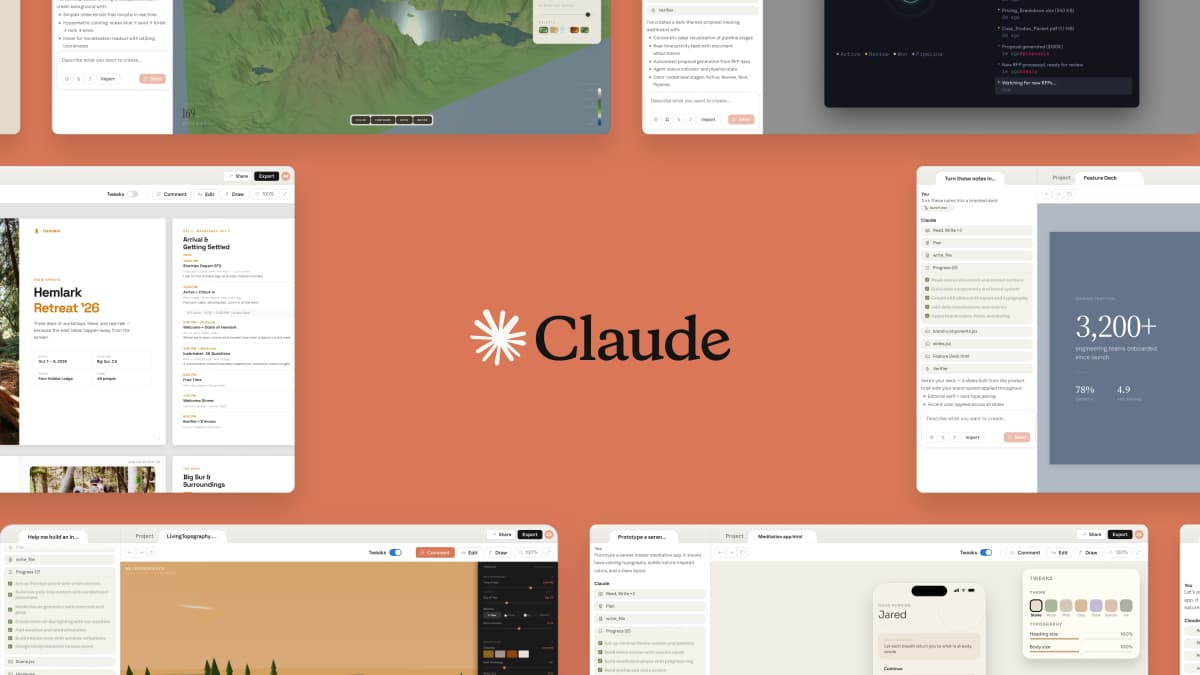
🎨 From Logic to Layout: Unpacking Anthropic’s Claude Design & the Agentic Future of Enterprise Ideation
TL;DR: Anthropic’s launch of Claude Design marks a pivotal inflection point: AI agents are transitioning from textual assistants to visual co-pilots. By enabling non-specialists to morph sketches and prompts into polished prototypes using Claude Opus 4.7, Anthropic is bridging the semantic gap between engineering systems and aesthetic intent. This isn't just a design tool; it’s a critical piece of the enterprise "workflow automation" puzzle, allowing teams to enforce strict design systems while accelerating the foundational phase of product development.
The friction between a founder’s vision and a developer’s execution is the universal bottleneck of modern tech. We live in an era of text-alignment, logic-checking, and code-generation, but the transition from a wireframe to a fully realized UI remains stubbornly manual. Enter the "semantic gap"—that complex chasm where human aesthetic intent must be translated into algorithmic styling properties. Anthropic’s latest release, Claude Design, is attempting to close this gap with a sophisticated, multimodal product that feels less like a toy and more like a "digital architect."
While competitors like Canva have been rushing to integrate generative AI into their marketplaces, Claude Design takes a fundamentally different philosophical approach. It isn’t trying to replace a graphic designer’s canvas; rather, it acts as a rapid-prototyping engine for product managers and founders who need to validate ideas visually before a pixel-pusher touches them. As Anthropic continues to pivot aggressively toward the enterprise and "prosumer" tiers, adding Claude Design to its suite of agentic tools suggests a future where humanity will use natural language to command not just the structure of software, but its very face.
🤖 The "Why Now" of Visual Intelligence
The surge in demand for tools like Claude Design isn't accidental; it correlates closely with the maturation of Large Vision Models (LVMs) and the Enterprise’s desperate need for speed. In 2024 and early 2025, the market shifted from asking AI to "write a C function" to asking it to "imagine this SaaS landing page." Why? because the "Code" era of AI has established that software can be built faster. Now, the bottleneck has shifted to image recognition and generative fidelity.
For enterprise teams, the "velocity of ideas" is currently the highest cost. A product manager in a whiteboard session might have a flash of insight regarding a user interface, but translating that mental model into Figma or Sketch takes precious minutes or even hours—the time lost is revenue and momentum. Furthermore, as we rely more heavily on "Design Systems" (libraries of reusable components like buttons, cards, and typography scales), maintaining visual consistency across a product is becoming a nightmare of manual overhead.
Anthropic’s timing is also keen. They are positioning themselves as the "Foundational Model" for workflow automation. Just as Opus 4.7 proved capable of reasoning through complex logic puzzles, the multimodal capabilities powering Claude Design prove the model can understand spatial relationships, layout hierarchy, and branding guidelines simultaneously. By offering this in Research Preview, Anthropic is effectively putting a stake in the ground, declaring that the next generation of enterprise work will be visual-first.
The Competitive Landscape Shift: The entry of Claude Design into the chat highlights a crowded but evolving market. While Midjourney and DALL-E have perfected the art of hallucinating photorealistic images from text, they lack the structural integrity required for UI components. Claude Design fills the specific niche of operational design—creating functional elements (buttons, text boxes, layouts) that can actually be used in a prototype or exported to a finished slide deck.
🏗️ Deep Tech Dive: Bridging the Semantic Gap
To understand the significance of Claude Design, we must look at the underlying architecture that makes it tick. It’s not merely a wrapper around an image generator; it is an application of Claude Opus 4.7’s reasoning capabilities to visual structuring.
🧠 Understanding the Multimodal Feedback Loop
The core technology here relies on a sophisticated feedback loop rarely visible to the end-user. When you describe a "serene mobile meditation app," the model doesn't just generate an image. It translates that semantic request into a series of layout tokens that define the DOM (Document Object Model) of the visual page.
Here is conceptual breakdown of what is happening in the background:
- Semantic Parsing: Claude parses the natural language request. It identifies intent ("serene", "meditation"), attributes (colors), and layout structures (mobile app).
- Stylization: It consults its internal knowledge base regarding design principles (white space, hierarchy, color theory) to select the appropriate visual assets.
- Generation: It uses VQ-VAE (Vector Quantized Variational Autoencoder) techniques—likely heavily derived from Claude’s vision encoder—to render the visual layout.
- Refinement: The user request "tweak the colors"—the model treats this as a modification to the vector space of the rendering, overlaying the new style map onto the existing geometry.
🧩 The "Design System" Integration Engine
Perhaps the most technically demanding feature of Claude Design is its ability to ingest and apply a company’s design system. In the enterprise world, a Design System is often a massive JSON or YAML configuration file containing thousands of rules (Font families, spacing scales, color tokens like brand-primary, const-disclaimer).
For a model to successfully apply these, it must have "domain knowledge" passed to it via System Prompts.
# Example Conceptual System Prompt Logic
SYSTEM_PROMPT = """
You are adhering to the 'Nebula' Design System (v2.4).
Adherence Constraints:
- Primary Color: Must be exactly #0052CC (SSC Blue).
- Typography: Body text uses 'Inter', size 14px, line-height 1.5.
- Spacing: Use the 4px grid system. All margins are multiples of 4.
- Component: Use the 'Card' component skeleton defined in schema_v2.json.
- Reject: Any visual output that uses system fonts (Arial, Helvetica) or available outside the palette.
"""
Claude Design can read the codebase or files referenced by the user to understand these constraints. This allows teams to maintain visual consistency without manually re-applying style guides. It effectively democratizes corporate governance. You no longer need a human designer to enforce that the "Product" header is always 32px bold; Claude can enforce it.
🔗 The Agentic Workflow: Integration & Export
Beyond generation, Claude Design shines in its interoperability. The prompt notes the ability to export to PDF, PPTX, or URLs, but the deeper technical value lies in the export pipeline. The output is likely an SVG or high-fidelity raster image with embedded semantic data.
When exporting to Canva, the system likely converts the generated design into Canva's internal JSON format or SVG structures that Canva understands. This creates a "hand-off" layer:
- Phase 1 (Claude): Rapid ideation, layout, and structure. Low fidelity but high velocity.
- Phase 2 (Canva): Fine-grained styling, image manipulation (adding photos, icons), and final polish (collaboration, comments).
- Phase 3 (Delivery): PDF/Export for stakeholders.
This pipeline is classic CI/CD for creatives. It separates the "Content Generation" (The "C") from the "Consumption" (The "C").
📊 Real-World Applications & Use Cases
If this technology is successful, we will see a rapid restructuring of how internal tools and marketing materials are produced across Fortune 500 companies. Here are concrete scenarios where Claude Design solves a tangible problem.
🚀 The Founder's MVP Sprint
For a lean startup, days are money. The founder has a vision for a dashboard. Instead of drawing rectangles in Figma or asking a developer to build a wireframe, they use Claude Design.
Scenario: The founder generates the prototype using the requested prompt.
- Input: "Show a SaaS dashboard for crypto analytics. Dark mode, neon green data lines, three columns for price, volume, market cap."
- Output: Claude generates a high-fidelity mock within seconds.
This allows the founder to pitch this to angel investors or B2B prospects immediately. It moves the conversation from "Does this feature work?" to "Does this look right?" much faster than text-based pitch decks.
📈 Operational Efficiency in Internal Comm
Modern companies (especially remote ones) struggle with the lack of physical whiteboards. When a product team meets to discuss a roadmap, they often stare at a blank screen. With Claude Design, it is now feasible to have a collaborative session where:
- The lead engineer explains a new logic flow.
- They ask Claude to visualize the "user journey" on one canvas.
- Constraints are easily tweaked: "Call out the login step in red," or "Make the 'Sign Up' flow vertical."
These generated visuals can be immediately saved and integrated into the corporate Confluence page or sent to the PR/Marketing team for press materials without the team trying to recreate the visual asset entirely from scratch.
🏛️ Enterprise Governance & Compliance
Large enterprises are terrified of brand dilution. A rogue employee might try to create a slide deck that accidentally uses the wrong font or a satirical color scheme (a "brand failure").
By embedding Claude Design into a specific "Partner Portal," IT departments can ensure that everything generated through the tool adheres strictly to corporate branding guidelines. If a user tries to generate a "more fun" version of the logo (which might be a legal issue), the system prompt constraints inherent in the design system integration can prevent the generation or force a revert to the approved "Primary" brand asset. This is effectively brand safety on autopilot.
⚡ Performance, Trade-offs & Best Practices
Like any generative visual technology, Claude Design is not magic. It carries specific liabilities regarding accuracy and consistency that engineers must manage.
🧪 The "Semantic Inversion" Error
One of the leading risks in AI visual generation is the "Semantic Inversion." This occurs when the AI understands the meaning of the instruction but fails to apply it spatially correctly.
- Example: Prompt: "Place the CTA button (Call to Action) at the bottom right."
- Failure Mode: The button appears at the top right, or sits directly over the navigation bar, compromising usability.
- Mitigation: Prompt engineering is now a skill. Asking for "use absolute positioning" or providing a grid context helps.
⚖️ The Trade-off: Context vs. Customization
A key trade-off is found in the "Design System" adoption. If the tool is too strictly bound to a design system, it might hallucinate if it doesn't have the specific asset files in its context window. Conversely, if it is too loose, it might drift into non-Corporate styles.
Best Practice: Hybrid Instruction Sets. Teams should not rely solely on the AI for creative direction. They should treat Claude Design as a "layout engine," not a "art director."
- Tip: Always provide the specific Content. If you want a card with a price of "$49", say it explicitly. If you rely solely on the visual appearance, the AI might guess $49.99 or "$499," leading to PR disasters in B2B sales collaterals.
💡 Expert Tip from the BitAI Architecture Lab: "Treat Claude Design like a low-code database. It is excellent at CRUD operations (Create, Read, Update, Delete) regarding UI layout. However, for complex layouts that require thousands of unique interactions (click-handlers, sub-states), do not export directly to production code; use the output as a high-fidelity prototype (Figma/Sketch interchange format) and have the dev team build the final implementation."
📉 Efficiency Metrics
When benchmarking the tool against human effort, the efficiency gains are surprising:
- Idea-to-Visual Ratio: A human designer might sketch 5-6 variations before finding a "winner." Claude Design can generate 10 variations in the time it takes to sketch one.
- Collaboration Parity: It eliminates the bottleneck of "passing the mouse." The prompter and the critical reviewer can sit side-by-side on the same screen, reviewing changes in real-time.
🔑 Key Takeaways
- 🚀 Velocity over Artistry: Claude Design prioritizes getting an idea onto the screen quickly over producing "fine art." It is the ultimate tool for the "minimum viable design."
- 🧩 Semantic Consistency: By integrating Design Systems, it solves the corporate headache of brand inconsistency by encoding governance rules directly into the AI agent.
- 🤝 Complement, Don't Compete: The synergy with Canva and Blum demonstrates an industry move toward specialized "hand-off" ecosystems where AI handles the heavy lifting of structure.
- 🧠 Agentic Evolution: Claude Design is a visual sibling to "Claude Coworker," cementing Anthropic’s strategy of moving from chatbots to action-oriented agents.
- 📊 Prosumer Targeting: It recognizes that the "power user" is no longer just the developer; it is the Product Manager who owns the experience.
- 💻 Opus 4.7: The power behind the panel. The reasoning capabilities allow it to handle complex layout logic that purely generative models struggle with.
- 🌐 Workflow Democratization: It allows experts to execute at a senior level, effectively democratizing the skill of high-fidelity prototyping.
🚀 Future Outlook: The 12-24 Month Horizon
Predicting the trajectory of Claude Design requires looking beyond the tool itself and into the integration of 3D environments and AR.
🕶️ The Shift to 3D and AR
We are on the precipice of a shift from 2D flat interfaces to 2.5D and 3D spatial interfaces (WebXR). The next version of Claude Design will likely move from generating PowerPoint slides to generating 3D web scenes. Imagine describing a "futuristic warehouse dashboard" and having Claude generate a real-time, navigable 3D view of the warehouse inventory management system. This would fundamentally change "product management" from viewing 2D screenshots to walking through an experience.
🔗 Native Browsers and "Zero-Click" Exports
The current workflow of "Create in Claude -> Export to Canva -> Edit" is a friction point. In 2026, we expect to see Claude Design bake natively into documentation platforms (like Notion or Linear) and web browsers. You might highlight text in a URL and right-click to "Generate UI mockups for this section." The interface between the text and the visual would become infinitely thin.
🧠 Personalized Design Systems
As agents interact with users, we will soon see "Adaptive Design Systems." If Claude Design monitors user engagement data, it might dynamically generate a UI layout that favors mobile-consumption habits for a specific demographic, auto-adjusting the text size and contrast ratios based on a user's browser history or user preference profile.
❓ FAQ
Q: Is Claude Design essentially Canva, but powered by AI?
A: Not exactly. Canva is a canvas and a library. Claude Design is a reasoning engine. Canva gives you the tools to move pixels; Claude Design gives you the pixels based on a verbal description. The synergy comes from the hand-off: Claude creates the structure quickly, which you can then take into Canva for final artistic polish.
Q: Does Claude Design allow for collaboration in real-time?
A: As of the current launch in Research Preview, the primary focus is on the generation and refinement of assets for a single user or a tight-knit team within the same subscription tier (Pro, Max, Team). However, the ability to export fully editable PPTX and Canva files implies a ready pathway for collaborative review and commenting once the visual is out of the "black box."
Q: How does it handle legal compliance regarding images?
A: This is a key point for enterprise. Claude Design uses "rendered" visualizations. If the tool creates a mockup of a person using your software, worries about using stock-photo IP usually apply only if you save and export that specific raster image for external public use. However, designers should always verify that the generated content doesn't inadvertently violate trademarks or style guidelines before final deployment.
Q: What happens if the generated design doesn't match the prompt?
A: The feedback loop is central to the product. Just as you would click "Regenerate" on ChatGPT, Claude Design allows for direct nudges ("Rotate this 90 degrees" or "Make the font bigger"). This iterative process acts as a form of Reinforcement Learning from the Human (RLHF) on the fly.
Q: Can I use Claude Design to write code for a website?
A: No, Claude Design is specifically for visual output and prototyping. If you need code, you should prompt Claude using the code-accelerated models (like Claude Sonnet 3.7 or Claude Opus 4.7 for coding). Claude Design is the "Front End" engineer, while the code models are the "Back End" architect.
🎬 Conclusion
The launch of Claude Design is a significant indicator of how the AI industry is maturing. We have moved past the phase of "Wow, look what AI can paint" to "Wow, look how AI can synthesize complex enterprise workflows." By empowering founders, PMs, and non-designers to generate high-fidelity structural visuals instantly, Anthropic is effectively flattening the learning curve of product design.
The "Silicon Valley Standard" for the next decade isn't just about writing better code; it's about communicating better ideas and executing on them faster. Claude Design provides the bridge. As this tool moves out of research preview and into the hands of the enterprise workforce, it will likely force other design tools to evolve or partner with LLMs just to survive. For the BitAI community, this signals the start of a new era where the barrier to entry for building beautiful, complex products is lower than ever.
Are you ready to hand over the keys to your product's visual future? Dive deeper into our analysis of agentic workflows and semantic modeling in the latest BitAI engineering logs.
Generated by BitAI Senior Content Strategy Team | June 2025 Edition
Share This Bit