AIAI AssistantAI Agents
How to Use Graphify: Turn Any Folder Into a Knowledge Graph with Zero Config
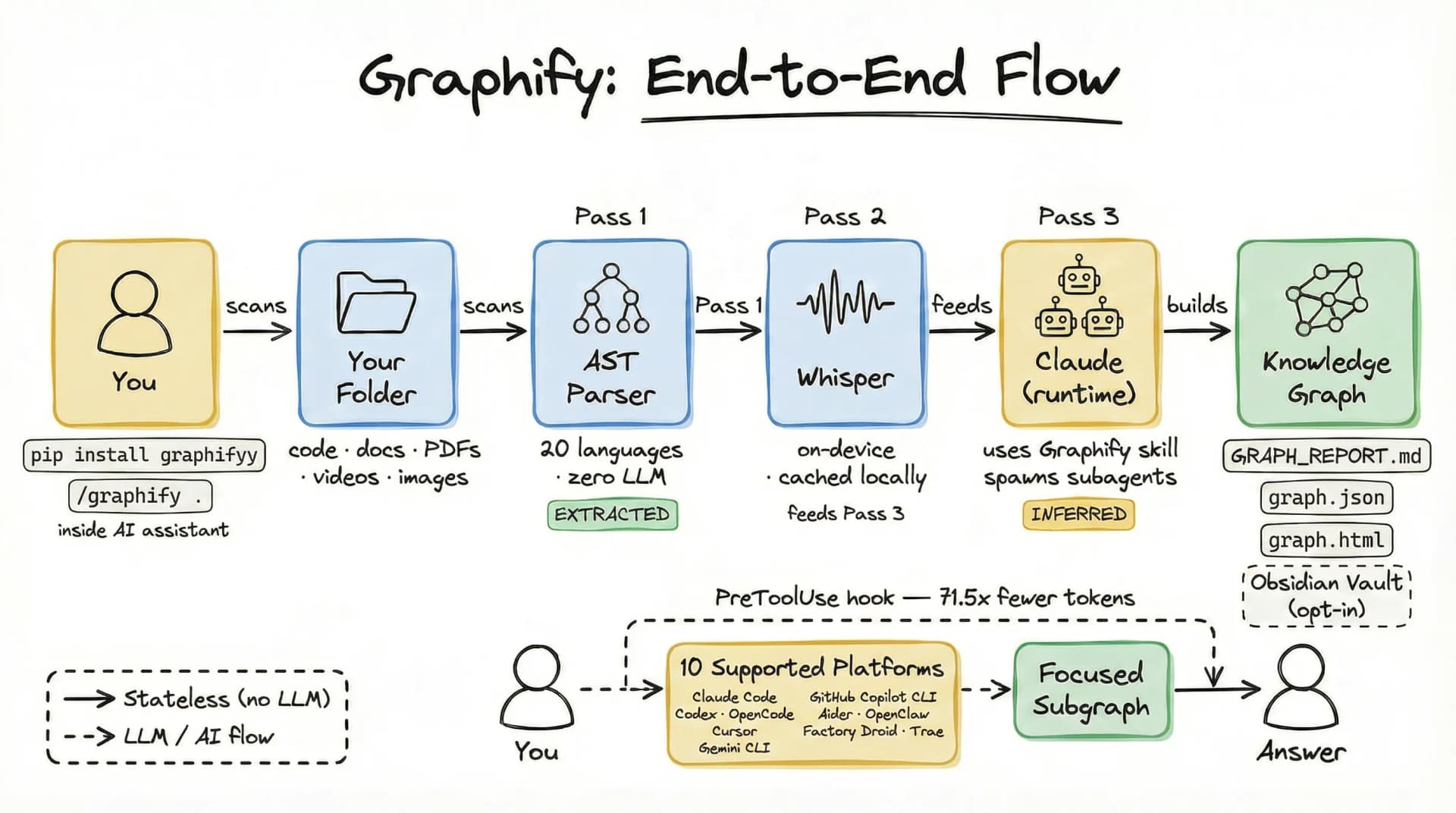
🚀 Quick Answer
- How to use Graphify: Install via pip and run the command
graphify run .to instantly transform your project folder into a queryable knowledge graph. - Core Mechanism: It uses three distinct passes: a local deterministic AST parsing phase, local audio transcription, and a parallel LLM extraction phase to build the graph.
- Provenance Architecture: Every relationship in the graph is tagged as EXTRACTED (factual) or INFERRED (AI-deduced), ensuring epistemic honesty.
- Output Formats: Generates
graph.jsonfor AI,GRAPH_REPORT.mdfor auditing, and an Obsidian Wiki for interactive navigation. - Token Reduction: By serving compact subgraphs instead of raw files, it can reduce token usage by up to 71.5x.
🎯 Introduction
When you master how to use Graphify, you solve the classic "Context Window Trap" that plagues every developer working with Large Language Models. How to use Graphify is the specific question developers with massive messy projects (code, PDFs, LOOM videos, screenshots) are asking right now. The standard RAG approach usually fails here because it treats documents as semantic blobs rather than structured entities. Graphify answers this by turning any folder into a queryable knowledge graph that excels at reasoning, not just retrieval.
Think about Andrej Karpathy's workflow: he dumped raw folders into an AI and struggled with the noise. Graphify bridges that gap. It moves beyond simple "File System RAG" by parsing the structure of your data before handing it to the LLM.
The problem: You cannot fit a 10 million line repository, plus 50 meetings, and 300 PDF docs into a single prompt. The solution: Snap a folder of data and let Graphify build a logical topology you can query.
🧠 Core Explanation
Graphify is an open-source CLI tool designed to build persistent knowledge graphs from heterogeneous data sources (code, images, audio, PDFs). It acts as a pre-processing pipeline that runs locally, building a graph where nodes represent entities (classes, functions, concepts) and edges represent relationships (dependencies, calls, mentions).
Unlike traditional Vector Databases, which rely on semantic similarity (embeddings), Graphify relies on strict structural relationships (topology). This allows AI assistants to navigate Logic Graphs rather than just searching for similar text.
🔥 Contrarian Insight
"Embeddings lie; graphs don't."
The AI industry obsesses over semantic search, but for code and engineering logic, embeddings are often misleading. Embeddings group "pizza" and "pizzeria" together, but Python's import statement is a logical relationship. Graphify's true superpower is separating deterministic fact extraction (what the code actually does) from probabilistic AI inference (what the AI thinks is implied). By forcing the AI to be explicit about its confidence—tagging edges as EXTRACTED (100% sure) vs INFERRED (low confidence)—you force the AI to stop guessing and start engineering.
🔍 Deep Dive: The 3-Pass Pipeline
To truly understand how to use Graphify effectively, you need to grasp its architecture. It runs in three distinct passes:
1. Deterministic AST Parsing (Pass 1)
This step happens locally, 100% offline, and requires no API key.
- Tool: Tree-sitter.
- Purpose: Extracts the hard logic of your codebase.
- Outputs: Classes, Functions, Imports, Call Graphs, Docstrings.
- Data Tag:
EXTRACTED(Confidence: 1.0). - Why this matters: You can verify this data. It's pure facts.
2. Local Transcription (Pass 2)
If your folder contains media (LOOM videos, Zoom MP4s), Graphify processes them here.
- Tool: faster-whisper.
- Purpose: Convert audio to text locally.
- Data Tag:
EXTRACTED. - Why this matters: Audio files never leave your machine, and SHA256 caching ensures you don't re-transcribe unchanged files.
3. Parallel LLM Extraction (Pass 3)
Graphify uses Claude subagents to process the "fuzzy" unstructured data.
- Purpose: Extract concepts, design rationale, and links from documentation, images, and transcripts.
- Output: Merged into the graph but tagged as
INFERRED(e.g., "User flow suggests this logic"). - Why this matters: This allows the AI to explain why architecture decisions were made.
🏗️ System Design & Workflow
The workflow is a pipeline optimization designed for production scale:
Input Layer:
- Accepts heterogeneous inputs (code, media, PDFs) via CLI.
Processing Layer (The Graph Engine):
- Topology Builder: Nodes are created for static entities.
- Relation Mapper: Edges are drawn based on function calls (dependencies) or semantics (mentions).
- Caching: Transcripts and embeddings are hashed. If input hasn't changed, Graphify skips the expensive "Remote LLM" pass.
Output Layer:
- graph.json: The machine-readable state.
- GRAPH_REPORT.md: A human-readable "Bill of Materials" for your knowledge graph.
- Obsidian Vault: A visual interface linked to your existing note-taking workflow.
🧑💻 Practical Value: Implementing Graphify
Here is your actionable workflow to integrate Graphify with your AI coding assistant.
Step 1: Installation
# Install the CLI
pip install graphify

# Run it on your project root
cd /path/to/your/project
graphify run .
Step 2: Verify the Output
After the run finishes, check your project root. You should see three new items:
GRAPH_REPORT.md: Scan this to ensure the graph looks sane.graph.json: Contains the full topology..obsidian/vault/: A new folder for visual graphs.
Step 3: Integration with AI Coding Assistants
Most modern VS Code editors (like Cursor or Desktop Claude) support Plugins or Virtual File Systems.
- Enable the PreToolUse hook in your AI editor's settings (Graphify provides standard hooks).
- Ask a complex question:
"Explain the
createOrderfunction's dependency chain." - Result: Instead of the AI wallowing through hundreds of files, it reads
graph.json, highlights the specific nodes, and constructs a 300-token summary accurate to the implementation.
Real-World Tip
Start with just a medium-sized codebase. Trying to graph a 100k file open-source repo might take a while, but a 5-10 file domain model will produce an almost magical feedback loop where the AI understands your intent instantly.
⚔️ Graphify vs. The Alternatives
| Feature | Graphify (Knowledge Graph) | Standard Vector DB (Pinecone/Weaviate) | Raw File Context |
|---|---|---|---|
| Search Type | Topological / Structural | Semantic / Vector Similarity | File System Directory |
| Context Understanding | High (Logic flows preserved) | Medium (Similar text) | Low (Text dump) |
| Token Usage | Low (Subgraphs) | Medium (Chunks) | High (Full Files) |
| Data Provenance | Explicit Tags (Extracted/Inferred) | Implicit/Probabilistic | None |
| Technical Complexity | Easy (One command) | High (Indexing pipelines) | None |
Verdict: Use Vector DBs for finding "documents that talk about X." Use Graphify to make your "codebase understand X."
⚡ Key Takeaways
- Context Window Compression: Graphify turns massive file dumps into tight logical structures, potentially reducing token usage by 71.5x.
- Epistemic Honesty: The
EXTRACTEDvs.INFERREDtagging system ensures you know exactly what the AI "hallucinated" vs. what the code actually contained. - Local & Private: By using Tree-sitter and Faster Whisper locally, your proprietary code never leaves your machine.
- The "Hook" Architecture: Using the PreToolUse hook allows your AI assistant to query the graph before it starts searching, saving compute time.
- Follow Karpathy's Lead: Don't just dump data into LLMs. Structure the data first.
🔗 Related Topics
- PeerReview: How to Analyze Software Architecture with AI
- Karpathy’s RAG Journey: Moving from Loops to Queries
- Obsidian vs. Notion: The AI Developer's Battle
- The Death of the Context Window?
🔮 Future Scope
The roadmap for Graphify implies a deeper integration with local model runners (like Ollama). Future updates will likely allow the graph to "reason" in real-time, where the graph acts as a dynamic state machine that updates the LLM as you type, rather than a static snapshot you query once a day.
❓ FAQ
Q: Is Graphify local only? A: The extraction phase is local. However, for the LLM-driven inference pass (Pass 3), it requires internet access to call an API (currently Claude).
Q: Does it support all programming languages? A: It uses Tree-sitter and supports over 20 languages (Python, JavaScript, Go, Rust, C#, etc.) out of the box.
Q: Can I query this graph from Python?
A: Yes, the graph.json output is standard and can be parsed by any script.
Q: What if the AI infers a wrong relationship?
A: You will see these flagged as INFERRED with a lower confidence score in GRAPH_REPORT.md, allowing you to verify them.
🎯 Conclusion
To answer your question on how to use Graphify: you install it, point it at a folder, and watch the "Context Window" problem vanish. This tool shifts the fundamental unit of data collection from "File Content" to "Logic Structure." If you are serious about building production-grade AI applications that understand complex codebases rather than just reading them, the future is structural, not just semantic.
Start your workflow today: pip install graphify && graphify run .
See you in the next one.
Share This Bit