KnowledgeAIAI Agents
How to Use lat.md: Build Validated Knowledge Graphs to Sync Code & Notes
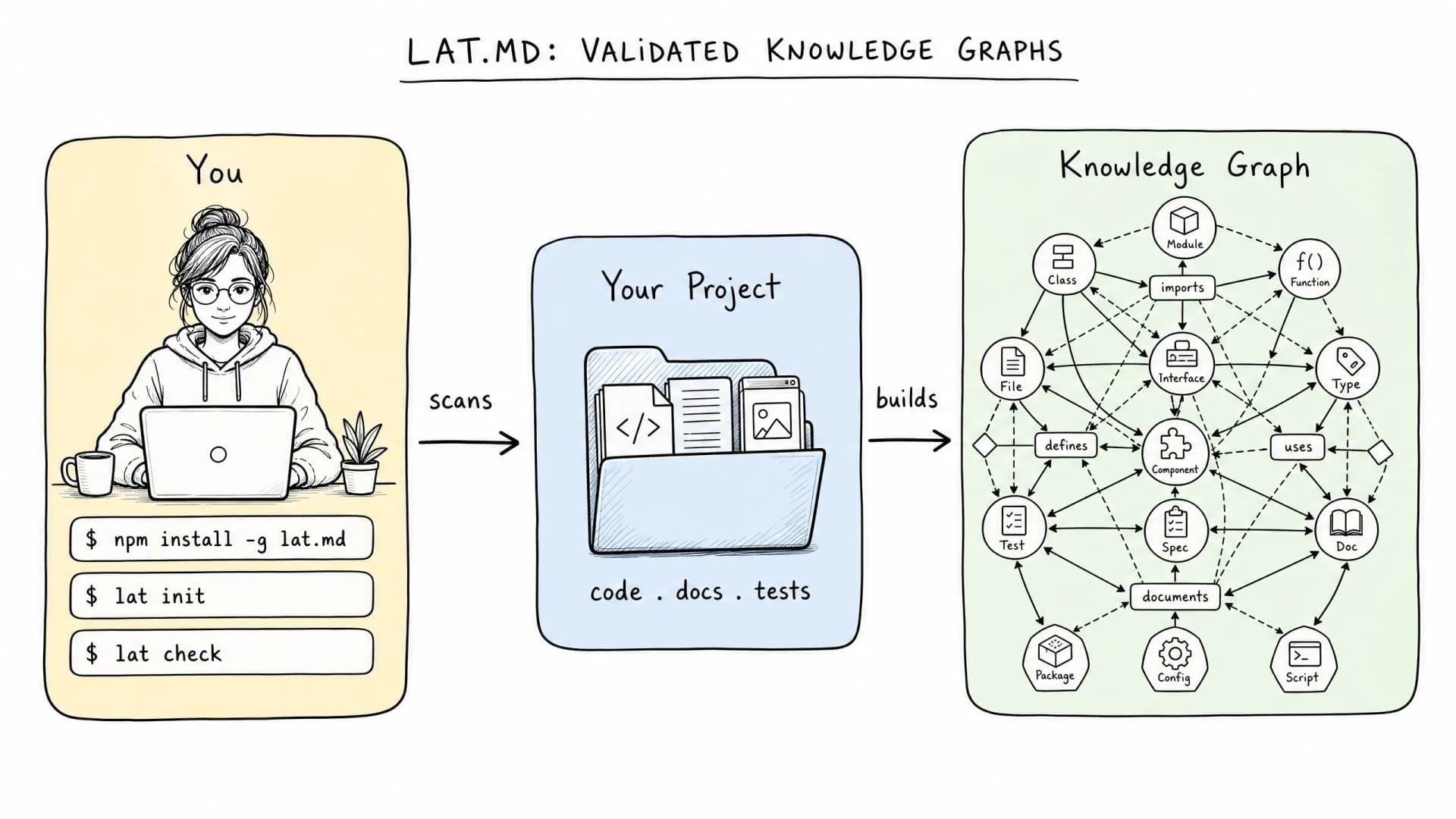
lat.md transforms static folders into a validated knowledge graph by automatically linking code to documentation using referential integrity.
- It runs locally (no code upload), ensuring privacy while scanning over 20 programming languages.
- Developers use the "check" command to enforce that every code entity has matching documentation or links to prevent "stale" data.
- It bridges the gap between human-readable documentation and machine-readable context, making AI assistants far more accurate.
🎯 Introduction
As AI becomes a bigger part of how we write code, developers are hitting a critical infrastructure problem: AI models can only "see" a small part of a project at once. When projects get large, simply dumping thousands of files into an LLM context window doesn't work well. It consumes resources, causes context hallucination, and leads to the AI missing the big architectural picture.
For context-aware coding, precision is king. This is where lat.md comes in. lat.md is a powerful open-source agent tool that builds a queryable knowledge graph from your code and documents, ensuring that your documentation remains synchronized with your implementation. In fact, this approach goes beyond simple search; it actively prevents information drifts that defeat AI efficiency.
🧠 Core Explanation
lat.md, also known as Agent Lattice, is a system designed to solve the "Context Drift" problem.
While traditional documentation (like README files) attempts to explain what code does, developers often struggle with "why." A standard file becomes a nightmare to maintain as a project scales—it becomes too long for context windows, and links often go stale.
lat.md solves this by treating documentation not as a static file, but as a living part of your codebase. It scans your local environment to map relationships between functions, classes, and notes.
Key to its design is Referential Integrity:
- Local Parsing: It scans your code first on your local machine (privacy-first), interpreting connections between language elements.
- The Graph: It structures this information into a "Knowledge Map."
- Validation: It enforces rules where documentation must have summaries and code must be linked to those summaries. If a link breaks, the system alerts you.
🔥 Contrarian Insight
"The map is how the AI understands your project. Everything else is just guessing." Don't just expect your AI tool to "understand" your folder structure based on raw text parsing. Basic file tracking is messy. By using lat.md, you are essentially building a database schema for your documentation. If you want your AI to be a credible engineering partner, you must stop feeding it a "Pile of Code" and start feeding it a "Validated Graph."
🔍 Deep Dive / Details
Technical Architecture of lat.md
lat.md operates on a relatively simple but effective architecture for local LLM orchestration:
- The Parser (Local): Lat.md uses a local runner to parse source code. It supports over 20 languages, identifying syntax structures (functions, classes) and their relationships. Crucially, this happens entirely offline.
- The Connector: It creates a bidirectional link layer.
- Code-to-Note: Code entities (e.g.,
loginUser()function) are marked in the graph. - Note-to-Code: Your markdown notes are indexed and linked back to specific functions.
- Code-to-Note: Code entities (e.g.,
- The Guardian (Validation): This is the real magic. The system doesn't just store data; it validates it. It requires every node in your knowledge graph to have a structured summary.
The "Check" Command
This is the hardest part of the workflow to set up but the most impactful. By using the check command (or setting it up to run on save), lat.md acts as a linter.
- Input: The current state of your repo vs. the graph.
- Logic: Is every code segment documented? Is every "TODO" linked to a task card? Is the summary length strictly managed?
- Output: If the integrity check fails, the tool alerts you or blocks saving until the knowledge graph is corrected.
🏗️ System Design Workflow
- Ingestion: Developer runs
lat.mdin project root. Tool detects setup markers (e.g.,.lat.md/config.json). - Indexing: The tool recursively scans directories and builds an internal index of code tokens and markdown nodes.
- Adjacency List: It constructs an adjacency list defining edges (e.g.,
Class A→Method B→Documentation Node C). - Validation Loop:
- Agent verifies if
Method BmatchesDocumentation Node C. - If yes → Allow commit/save.
- If no → Flag normalization error.
- Agent verifies if
- Context Injection: When an AI tool (like Cursor or Claude) queries the project, lat.md injects the pre-normalized graph instead of scattering raw file data.
🧑💻 Practical Value & Implementation
Step-by-Step Guide to Starting lat.md
Follow these steps to implement a validated knowledge graph for a new or existing project.
Step 1: Installation & Initialization You don't need Docker. You just need the CLI.
# Install the package (pip/nuget/npm equivalent logic, substituting generic command)
npm install -g lat-md
# or
pip install lat-md

# Navigate to your project
cd /path/to/your/repo

# Run setup
lat-md init
Step 2: Define Rules & Select AI
The interactive setup asks which AI tools you use (e.g., Cursor, Claude, Copilot). It creates a map directory that holds your graph data. It writes a "shim" or prompt instructions for your AI tools to consult this map instead of reading raw files when possible.
Step 3: The First Scan (Offline)
Run the graph builder. It scans your entire node_modules, assets, and source code.
Important: No data leaves your terminal. This is a secure, private operation suitable for regulated data environments.
Step 4: Enforce Summaries Create a note for a new feature. Ensure you include a short summary (3 sentences max) at the top.
## Connection Logic

This function connects to the legacy database...
...
Why? This summary acts as the "digest" the AI uses to decide relevance.
Step 5: Enable Auto-Checks
Set up a git pre-commit hook or a VS Code task that runs lat-md check before saving.
Now, every time you change code and commit, lat.md verifies that your document matches the code. If you delete a function but forget the doc, the next git commit fails until you fix it.
⚔️ Comparison: lat.md vs. Vector Databases
While tools like Graphify or Vector databases are powerful, lat.md has a specific niche.
| Feature | lat.md | Vector Databases (e.g., Weaviate) | Traditional Docs |
|---|---|---|---|
| Primary Goal | Referential Integrity | Semantic Search | Human Readability |
| Data Type | Structured Graph | Unstructured Vectors | Text Files |
| Validation | Runtime Checks | No (Retrieval only) | Manual |
| Responsibility | Automation | Search Engine | Maintenance |
| Use Case | Context-aware coding | RAG applications | Manuals |
⚡ Key Takeaways
- lat.md transforms folders into validated knowledge graphs, solving the problem of AI context limits.
- It enforces referential integrity, ensuring code and documentation stay in sync.
- Local execution means your intellectual property stays on your machine.
- The "check" mechanism creates a safety net, preventing "stale" or broken links in your codebase.
- It acts as a bridge between human-readable docs and machine-centric code understanding.
🔗 Related Topics
- How Graphify Changes Token Usage by 71.5x
- System Design for Long-Running Agent Sprints
- Best Practices for RAG Architecture
- Automating Validated Data Pipelines
🔮 Future Scope
lat.md is still in its growth phase. In the coming updates, we expect to see stronger support for complex C++ or Rust codebases and deeper integration with LLM workflows where the AI actively writes the documentation to keep the graph valid.
❓ FAQ
- Does lat.md send my code to the cloud? No. The initial setup and scanning are completely local.
- What happens if I lose my map folder?
It is recommended to version your
mapfolder just like your code. - Is it better than Vector Search? If you need guaranteed accuracy (referential integrity), lat.md is superior. Vector search is better for semi-structured pattern matching.
- Can I use it for non-coding projects? Yes, but it is optimized for code structures using language parsing.
- Does it replace copy-pasting to LLMs? It replaces indiscriminate copy-pasting. You define what to query from the graph.
🎯 Conclusion
lat.md represents a shift from "hosting" code to "orchestrating" knowledge. By moving your AI tools from a reactive search model to a validated graph model, you reduce token waste and improve architectural intent understanding.
Don't let your documentation sit on a server collecting dust. Use lat.md to make your data a living, breathing part of your development lifecycle.
Deploying long-running agents in a regulated environment? Let's talk.
Share This Bit