SwiftSwiftUI
Stop Using print(): Master SwiftUI Unified Logging with os_log
🚀 Quick Answer
- SwiftUI Unified Logging is the production-standard API for system-level logging in iOS/macOS.
- Unlike
print(),os_logis non-blocking, supports privacy filtration, and integrates natively withConsole.app. - Use
os_logfor critical events, errors, and performance metrics; reserveprintsolely for immediate scratchpad debugging. - Structured subsystems in
os_logallow developers to filter and analyze logs even from remotely deployed user devices.
🎯 Introduction
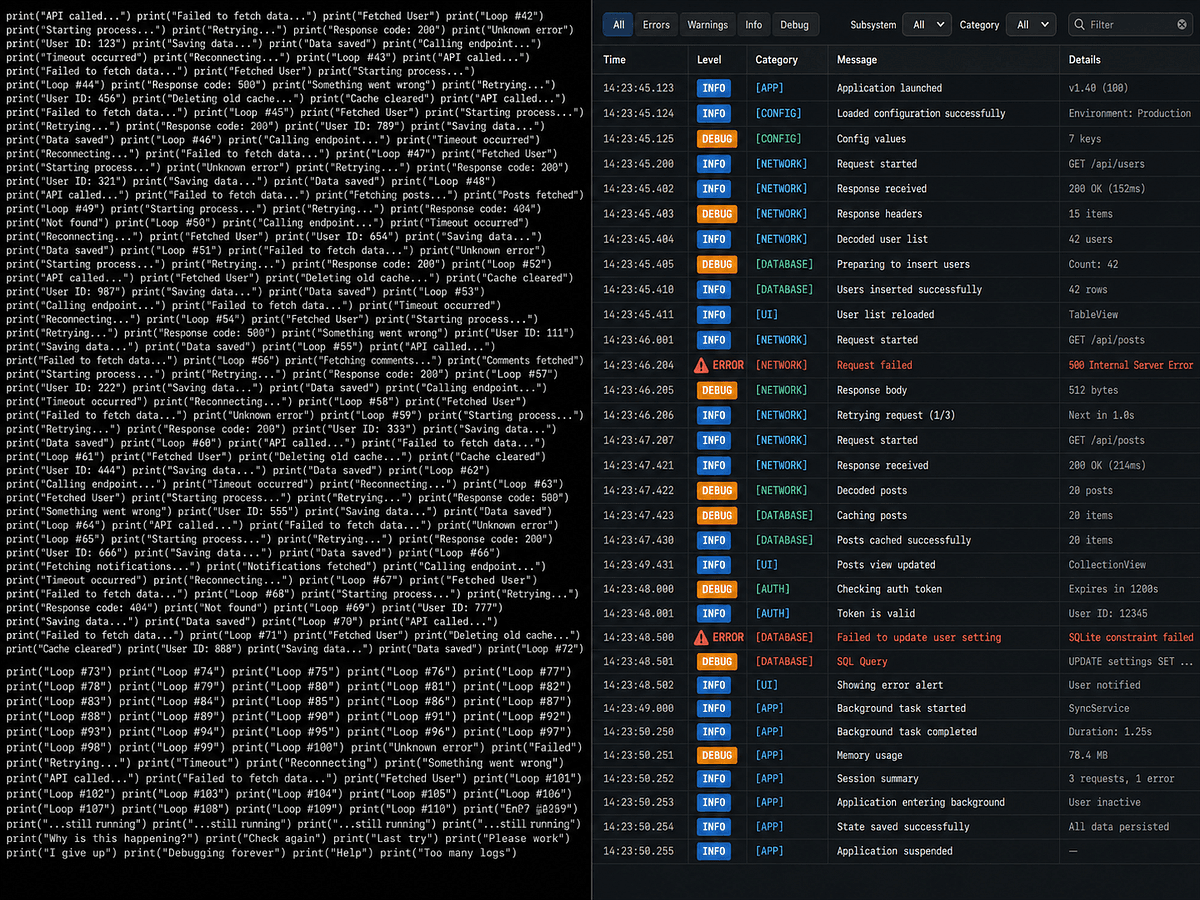
Stop relying on print() for critical app failures. If you want to reliably debug SwiftUI Unified Logging issues, you must transition away from the command-line staple. In my experience as a backend engineer, I’ve seen too many iOS apps fail silently in production simply because the developer’s loop was bound to simulator.
The problem isn't that code doesn't exist; it's that the logs aren't there. When a user reports a crash, and you frantically search your dark codebase for print("--- API Called ---"), you've already lost the battle. SwiftUI Unified Logging is the solution. It provides the observability required to move from "making things work" to engineering the system to fail gracefully. Developers often struggle with device-specific debug logging, but os_log handles the "device state" logic for you, ensuring you only see output when a debugger is attached, automatically filtering PII, and maintaining thread safety.
🧠 Core Explanation
Unified Logging is Apple’s replacement for the NSLog function. It is purely a software-level API. When a method like os_log is called and the simulator or Mac is connected, it sends the data to the Console.app on the host machine. When the app is running on a device in the wild and no debugger is attached, Apple's operating system optimizes these calls—often removing them entirely to save CPU cycles.
This is the fundamental difference: print is an imperative output action; os_log is a declarative system signal.
🔥 Contrarian Insight
"If you are still using print in production code, you are not debugging; you are gambling."
It may seem harsh, but print synchronously blocks the main thread. In a high-demand SwiftUI UI, a blocking print statement can manifest as UI freezes that users blame on the OS when the real culprit is your debug code. SwiftUI Unified Logging is not a toy; it's the architectural backbone of system integrity.
🔍 Deep Dive / Details
The Performance Hit (CPU Cycles)
As mentioned, print() is synchronous. This means your app pauses until that string buffer is flushed. If you accidentally leave a verbose logger in your release build, you have effectively weaponized your users' phones against themselves.
Here's the catch with libraries like CocoaLumberjack: They are fantastic for Android (where logcat is fast) or complex server-side architectures, but for a standard iOS app, they add massive overhead. The native solution (os_log) scales better because the OS manages the I/O.
Structured Logging System
One of the most powerful features of the Unified Logging system is the Subsystem.
A Subsystem is a unique identifier for your app. If you tag every log with a descriptive subsystem, you can filter logs by category instantly in Xcode Console or macOS Console.app. This is essential for aggregating data across different parts of your app (networking, data persistence, UI).
🧑💻 Practical Value
Why this happens
In SwiftUI, view lifecycles are complex. Functions like onAppear and onChange might fire multiple times or in unexpected order across view updates (e.g., navigation). Without structured logging, you can't tell if an API call is firing accidentally because of a view refresh.
Production-Level Implementation
Here is a production-ready Logger wrapper that you can drop into any project. It solves the boilerplate issue and standardizes your subsystems.
import os

// 1. Define your System Subsystem - consistent across the entire app
let appDelegateSubsystems = ["com.yourcompany.app.sharing", "com.yourcompany.app.networking"]

// 2. A generic singleton logger using the Unified Logging API
class AppLogger {
    private let logger = OSLog(subsystem: "com.yourcompany.app", category: .general)

    enum Category: String,OSLogType { // Strict adherence to OSLog
        case networking
        case viewLifecycle
        case critical
    }

    func debug(_ message: String, category: Category) {
        os_log("%{public}@", log: self.logger as OSLog, type: .debug, message)
        // You can chain this to NSLog for strict Xcode console output
        NSLog("[\(category.rawValue)] \(message)")
    }

    func error(_ message: String, category: Category) {
        os_log("%{public}@", log: self.logger as OSLog, type: .error, message)
    }
}
Usage in SwiftUI:
import SwiftUI

struct UserProfileView: View {
    let logger = AppLogger()

    var body: some View {
        VStack {
            Text("User Profile")
                .onAppear {
                    // Lifecycle tracking
                    logger.debug("UserProfileView appeared", category: .viewLifecycle)
                }
                .onChange(of: username) { oldValue, newValue in
                    // State change tracking
                    logger.debug("Username updated from \(oldValue) to \(newValue)", category: .viewLifecycle)
                }
                .onTapGesture {
                    logger.debug("Profile tapped", category: .general)
                    // Sync operation
                    logger.debug("Syncing local data...", category: .networking)
                }
        }
    }
}
Mistakes to Avoid
Don't rely on System Category: Just sticking to .default for everything makes filtering impossible. Explicitly define categories like .networking or .user_events.
⚔️ Comparison Section
| Feature | print() | os_log (Unified Logging) |
|---|---|---|
| Performance | Synchronous. Blocks threads. | Asynchronous. Safe for main thread. |
| Thread Safety | Not guaranteed across threads. | Designed for thread safety. |
| Device Debugging | Only works in simulator/terminal. | Auto-filters on devices (is Debugger Attached?). |
| Integration | No relation to Console.app. | Native integration with Xcode & macOS Console. |
| Critical Crashes | Can sometimes trigger unhandled exceptions if nil. | Handles gracefully, no app crashes. |
| Privacy | None. Leaks data. | Supports data masking via .privacy. |
⚡ Key Takeaways
- Performance:
print()is a performance bottleneck; migrate toos_logimmediately. - Observability: Use Subsystems to make your logs searchable and filterable in
Console.app. - Smart Filtering: The OS automatically suppresses
os_logmessages when running natively, saving battery and CPU. - Atomic Typing: Explicitly define log categories (Networking, UI) for cleaner output.
- Production Safety: Never ship
printstatements in your release build.
🔗 Related Topics
- SwiftUI Concurrency and Actor Isolation: Why Your Logs Disappear
- System Design: Implementing Crash Reporting in iOS Apps
- Debugging layouts with Xcode
View Inspectorand Visibility modifiers
🔮 Future Scope
As we move toward Apple Intelligence and more on-device processing, the granularity of logs required for debugging will increase. Expect Unified Logging to become even more integrated with Observability platforms (like Datadog or New Relic) via the new OSLog subsystems API, allowing you to ship logs directly to cloud dashboards without writing custom networking wrappers.
❓ FAQ
-
Does using os_log slow down my app? No, on real devices. Apple's OS updates the OSLog subsystem to be asynchronous and is optimized to drop logs if the device is already under heavy load to preserve battery.
-
Can I see os_log on a physical device connected to Mac? Yes, using Xcode's "Cocoa Lumberjack" or Apple's native logic: open Console.app on your Mac, select your device from the sidebar on the left, and you will see the logs in real-time.
-
What is the difference between print and NSLog?
NSLogis synchronous and outputting to the Unix standard error stream.os_log(Unified Logging) is structured, asynchronous, and part of Apple's modern OS ecosystem for managing large volumes of data efficiently. -
Why does my log disappear in the Simulator? Ensure you are not running directly on the simulator.
os_logis designed to be "sparse" in the simulator to mimic production behavior. You should see logs in the Xcode "Debug Area" (cmd+shift+y) rather than the console output. -
Can I use os_log in a static context (like inside an extension)? Yes, as shown in the wrapper code above, you can define the logger instance in a Singleton, but avoid using
@MainActorstatic methods for logging to prevent thread safety issues.
🎯 Conclusion
Transitioning from print to SwiftUI Unified Logging is less of a coding exercise and more of a mindset shift. It forces you to think about observability, performance, and the user experience, not just the immediate logic. By implementing the os_log wrapper and assigning proper subsystems, you equip yourself with the tooling to find bugs that would otherwise be invisible, turning a likely production crash into a trivial debugging session.
Start using Apple's built-in os_log today—your future debugging self will thank you.
//
Share This Bit