CodexOpenAIAIAI AssistantAI Agents
The Autonomous Workspace: OpenAI’s Codex Elevates to the Desktop Era
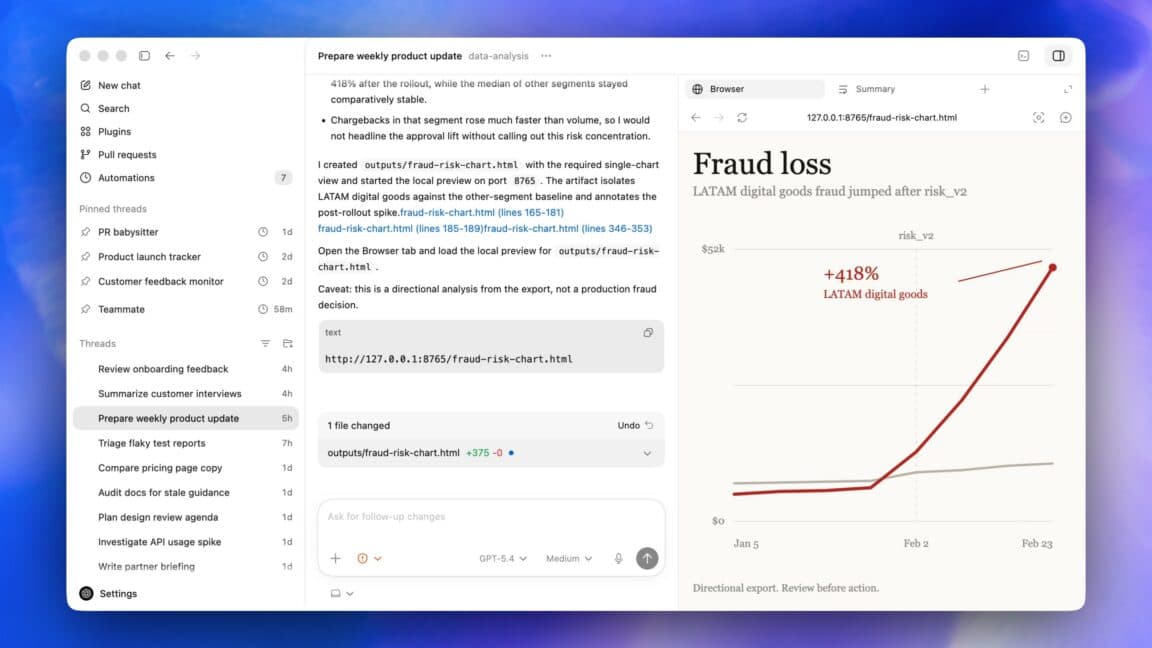
🪟 The Autonomous Workspace: OpenAI’s Codex Elevates to the Desktop Era
The era of the AI assistant peering over your shoulder, waiting for a specific prompt before revealing its value, has officially closed. We have entered the phase of autonomous agents—software entities designed to inhabit our operating systems, manipulate our GUIs, and execute tasks with a level of persistence that traditional CLI tools or even simple chatbots could never aspire to. OpenAI’s Codex desktop app update, rolling out to users today, is not merely a feature rollout; it is a profound architectural signal. It ushers in an age where "computer use" transforms from a static mode of operation into a living, breathing environment within your OS.
In this deep-dive exploration, we will dissect the mechanics behind Codex’s new ability to perform tasks in the background, leverage gpt-image-1.5 for visual iteration, and handle browser-based workflows with unprecedented nuance. We will analyze how OpenAI is poaching territory traditionally claimed by native operating system shells and browser extensions alike, effectively paving the way for their rumored "super app." Whether you are a frontend engineer architecting complex systems or a knowledge worker drowning in digital bureaucracy, understanding this evolution is critical to staying relevant in the next decade of software engineering.
TL;DR: OpenAI’s Codex update introduces "background computer use," allowing multiple agents to work on your Mac or PC parallel to your own sessions. This unifies development tools, APIs, and browser interactions into one autonomous agent capable of multimodal reasoning, hinting towards a consolidated "super app" ecosystem.
🚀 The "Why Now" — The Shift from Interaction to Orchestration
Why has the industry collectively paused to notice this particular update? The answer lies in the maturation of Large Language Models (LLMs) from stochastic parrots into capable generalist agents. In 2024 and early 2025, benchmarks showed that API-heavy workflows were becoming saturated. We can generate code faster than we can deploy it; we can iterate on mocks faster than we can validate them against human expectations. The bottleneck had shifted from generation to execution and integration.
This update arrives at a pivotal moment when "IT Friction" is at an all-time high. Developers no longer fight syntax; they fight context. Frontend iterations require switching between Figma, VS Code, a running localhost server, and a browser. Knowledge workers possess documents scattered across PDFs, Notion pages, and email threads. The utility of a tool that can bridge these gaps permanently—without manual copy-pasting or tab switching—is massive.
Statistically, workflows that rely on "token passing" between tools see a latency spike of approx. 3-5 seconds per hop. By removing the middleman—requiring an agent to directly see and click—it pushes latency toward zero. This update is a direct response to the "Application Boundary" problem. Until now, you could ask ChatGPT to design a webpage, but getting it to actually put that HTML into a file and run locally required three separate steps. Codex’s new background agent capability collapses these steps into a single, continuous stream of consciousness. It changes the paradigm from "I command you" to "I instruct, you master."
🧠 Deep Technical Dive — The Mechanics of Non-Invasive Computation
The core of this update is the "background computer use" feature. To understand its weight, we must look under the hood. This feature isn't just a remote desktop vignette; it is a sophisticated, state-aware simulation of human interaction.
🖥️ The Architecture of Autonomous Agency
To achieve "background" autonomy, OpenAI has likely refined the rendering pipeline of the agent. Standard screen-scraping agents fail when the UI changes. If a DOM element moves 10 pixels, a static scraper breaks. Codex now leverages a dynamic vision model trained on UI layouts and visual affordances (what you can click).
The technical magic lies in the agent's ability to simulate mouse gestures and keystrokes at a speed optimized for UI responsiveness without triggering "spam" detection or latency. It involves three distinct layers:
- Perception: A high-resolution visual input stream processed by a vision encoder.
- Reasoning: An LLM parsing the visual context to understand the current page state and intent.
- Action: A precise action space (click, scroll, type, select) mapped to the UI elements.
This creates a feedback loop. The agent performs an action, observes the visual result, and corrects based on the new state. Because it runs in the background, it can delegate these actions without hijacking your keyboard (on a Mac) or your CPU focus (on Windows/Linux).
🤖 Multi-Agent Parallelism: The Swarm Intelligence
Perhaps the most technical leap is the ability to run "Multiple agents." In traditional coding, you write a loop; here, you spawn a swarm.
Strategic Implementation: Imagine a complex microservice architecture deployment. You can deploy Agent A to handle the Docker compose file validation and environment variable checks in the terminal. Simultaneously, Agent B can spin up a Chrome instance and traverse the frontend application to perform regression testing on the landing page. Agent C can initiate a new tab, navigate to your hosting provider's dashboard, and verify SSL certificate expiration dates.
The technical challenge here is process isolation and resource arbitration. Running several of these vision-based loops concurrently consumes significant GPU and CPU resources. The OS scheduler must ensure that while Codex is rendering a window in the background to read a search result, it isn't starving your primary development environment of resources. The prompt notes it "can do this without interfering with what you are doing," suggesting a sophisticated pre-emptive scheduling or co-processor implementation where the agent's rendering is offloaded or highly throttled when heavy foreground work occurs.
⏳ Temporal Delegation: The Time-Traveling Agent
The inclusion of scheduling—tasks planned hours, days, or weeks in advance—is a fundamental shift from synchronous to asynchronous computing.
Technically, this requires a "Memory Core" and a "Scheduler." The agent must be able to save its state (visual context, variables, terminal history), drift to sleep, and wake up—or "resurrect"—at a specific timestamp with the full context of where it left off.
Why this matters for DevOps: Refactoring a legacy codebase often requires watching compilation errors cascade through 50 files. Currently, you have to monitor this manually. An agent that schedules itself to "monitor the build" for 4 hours, debug the first error, schedule itself to check again in 30 minutes, and iterate until success, represents a form of "aging in place" software engineering. It treats the computer not as a piece of hardware, but as a terrain the agent is exploring over time.
🌐 The Semantic Browser and Collaborative Annotation
The native web browser integration goes beyond simple navigation. It introduces a "Semantic Layer" to the web. The agent doesn't just read text; it anchors actions to DOM nodes.
The "commenting" feature is particularly intriguing. It allows a human to leave comments directly on web pages—akin to using a highly intelligent Figma commenting tool, but for live web development.
If an agent is building a prototype of a checkout flow, the PM or Dev can highlight a "Checkout" button, type "Make this button red and wobble when pressed," and leave it. The agent picks up this comment, finds the corresponding DOM node visually, and injects the CSS. This creates a seamless pipeline where the agent is the executor of human intent marked on the visual surface.
🖼️ Visual Synergy with gpt-image-1.5
The integration of gpt-image-1.5 allows the agent to bridge the text-to-image gap in the workflow. Instead of keeping a separate tool open for generating marketing assets, Code can generate a mockups and place them directly into the UI context.
For example, an agent might generate a high-fidelity image of a dashboard widget. It doesn't just save it; it places it into the "Widgets" folder in the project structure and references it in the component code. It understands the relationships between image generation and layout positioning.
🏢 Real-World Applications & Strategic Use Cases
To visualize the utility, we must move beyond theory into production scenarios. Here is how this technology impacts the workflow of high-performance engineering teams.
Frontend "Paint-By-Numbers" Stripped of the Latency
Frontend developers often spend unnecessary time mocking up data. The "Happy Path" is easy; the edge cases are hard. With background Codex, a developer can describe a complex dashboard where 12 different data points interact.
Codex can spin up a local environment, generate the boilerplate React components, wire up dummy data that looks real, and then generate the corresponding Figma wireframe assets using gpt-image-1.5. If the developer or designer clicks on a specific button in the generated UI and says "Change this icon to a lightning bolt," the agent modifies the code and the asset simultaneously. The iteration cycle moves from minutes to seconds.
Generative Testing for Legacy Applications
One of the biggest challenges in enterprise software is testing applications that lack a modern testing API. Mainframes, custom CRMs, and in-house legacy tools often rely on visual logic or complex mouse-hopping sequences that scripts cannot replicate without massive instrumentation.
Codex excels here. It can treat these applications like any other OS process. It can click through a legacy CRM setup wizard 50 times to ensure the error handling works for every entry point. It doesn't need to know the internal math; it only needs to see the UI. This democratizes quality assurance, allowing a junior engineer to command an army of agents to test the "Black Box" of a legacy system overnight.
Knowledge Work Permeation
For non-developers, this feature solves the "Dash of Data" problem. Financial analysts or product managers can ask the agent to "Scan our internal wiki and summarize the state of the Q3 roadmap."
The agent navigates the Intranet, opens PDFs, opens presentation slides, and summarizes them into a coherent document while the user works on a spreadsheet. It can take instructions during this process, such as "Focus only on the marketing budget slides" or "Highlight any risks mentioned," without needing to filter through the irrelevant context beforehand. The agent curates the environment for the user.
⚡ Performance, Trade-offs & Best Practices
Transitioning to an agent-based workflow requires a shift in mental model. Latency is no longer just about your internet connection; it is about the decision-making overhead of the agent.
Expert Tip on Agent Safety:
🛡️ The "Circuit Breaker" Rule: When instructing an agent to perform actions on your system, always assume it is a sandboxed root user until proven otherwise. Never let an agent perform a destructive action (like "Delete all node_modules") without a manual confirmation step. Use Codex's "Comment" feature on the terminal screen itself to ask clarifying questions before the agent executes complex git resets or destructive file operations. Treat the agent's "eyes" as read-only until you explicitly grant it write permission for the specific action.
Key Trade-offs:
- Compute Costs vs. Speed: Running a constant visual stream in the background consumes GPU compute. For a user on a local laptop, this will drain battery faster than typical cloud LLM usage. OpenAI must be optimizing for low-bandwidth visual inference to make this viable for daily desktop use.
- State Loss: Because the agent runs in the background, if the OS crashes or the application closes, the agent loses its state. Unlike a server-side bot that sleeps and wakes, a local desktop agent represents a fragile state. Reliable "Time Travel" scheduling relies on the OS's ability to persist process memory, which can be finicky.
- Context Window Limits: Visual data consumes tokens quickly. A high-resolution screenshot of a desktop is thousands of tokens. To maintain background awareness, the agent must aggressively resize or crop inputs to fit within its context window, potentially losing peripheral details.
Best Practices for Developers:
- Granular ACLs: OpenAI's 90 new plugins suggest deep integration. Users should map plugins to strict permission sets. Let the "File Explorer" plugin read, but restrict the "Terminal" plugin from running
sudo rm -rfunless absolutely necessary. - Test Environments: Never run background agents in production dashboards. Create isolated "playground" desktop spaces or containers for agents to tinker in, ensuring sensitive data or customer-facing interfaces aren't screenshot by a background process.
- Inventory Your Desktop: The agent wants to use "all the apps." Before activating background mode, identify the apps you intend for it to ignore (e.g., Password managers, private chat apps) and write a system-level rule (or handle it via prompt engineering) to block these domains.
📌 Key Takeaways
- 🖥️ Absolute Autonomy: Codex is transitioning from a passive chatbot to a proactive desktop occupant capable of independent GUI manipulation.
- ⚡ Zero-Click Context Switching: By navigating browsers and terminals directly, the agent eliminates the latency traditionally associated with copying data between tools.
- 🧩 The Super App Ecosystem: This update is a strategic blueprint; it merges the capabilities of current separate tools into a unified agent that hints at the future "OpenAI Super App."
- ⏳ Time-Based Tasking: The ability to schedule work days in advance signifies a shift toward asynchronous digital labor, where agents work while humans sleep.
- 🎨 Multimodal Synergy: The integration of
gpt-image-1.5allows the agent to understand visual fidelity, not just text, collapsing the gap between design and dev. - 👥 Parallel Intelligence: The introduction of multi-agent capability allows for specialized sub-tasks (e.g., one agent for testing, one for documentation) running simultaneously.
- 🛡️ Privacy Paradigm Shift: Running this locally on your machine changes the data privacy conversation. Code and secrets remain on-device, but the execution of actions is remote, creating a hybrid privacy model.
🔮 Future Outlook — The Road to the Super App
The trajectory laid out in the 2026 update—a convergence of Atlas, Codex, and custom agent tools—is unmistakable. Thibault Sottiaux’s assertion that they are "doing the sneaky thing where we’re building the super app out in the open" is a masterclass in transparency. Rather than dropping a massive, bloated monolith all at once, they are incrementally converging the necessary functionalities into a single, high-performance desktop agent.
Over the next 12-24 months, we will likely see this "Super App" logic extend beyond the desktop. We can expect mild OS-level integrations where these agents can:
- Manage System Settings: Automatically adjusting GPU fan curves or memory allocation based on detected computational loads.
- Unified Storytelling: A workflow where an agent reads a game design doc, generates the narrative script, builds the 3D assets, and compiles the executable test build without human hand-holding.
- Cross-Platform Consistency: Using the Mac as the central "brain," coordinating an Apple TV app, a web dashboard, and a mobile iOS app to share a single, persistent state.
The distinction between "user" and "software" will blur. We will not ask software to "do X"; we will describe the goal, and the Super App—represented by Codex—will decompose, execute, and oversee the solution itself. For engineers, this means the next skill to master isn't just coding syntax, but Orchestration Architecture—designing workflows for the agents to inhabit.
❓ FAQ
🤖 What exactly is "background computer use" in Codex?
Background computer use allows the Codex agent to run continuously in the system tray or background process. It can "see" your screen (using vision models) and "click" or "type" on your computer without opening a continuous overlay window. This allows it to perform long-running testing loops or documentation updates without pausing your work or leaving messy UI overlays on your screen.
🔐 Does this pose a security risk to my computer?
While the technology reduces friction, it introduces a new attack surface similar to remote desktop or screen sharing software. However, because this likely stays local (on-device inference for vision) and uses encrypted cursor inputs to OpenAI's API, the latency is low. As with any AI tool, users should be cautious about executing destructive commands (like "format disk") and ensure their visible desktop doesn't contain sensitive Personally Identifiable Information (PII) or API keys when background agents are active.
🌐 Can Codex browse the full internet, or just active tabs on localhost?
The update notes it currently works well with localhost web applications. However, OpenAI plans to "expand it so Codex can fully command the browser beyond web applications on localhost." This suggests a roadmap that includes navigating live public websites (like AWS portals or support forums) in the future, making it a powerful tool for automating registration flows, ticket submissions, and research work.
🎨 How does the new image generation feature integrate into the workflow?
Codex now utilizes gpt-image-1.5. This isn't just a separate feature; it integrates directly into the agent's context. If an agent is building a UI layout, it can generate the necessary marketing imagery, buttons, or graphs and embed them into the local files or local variables without the human needing to leave the coding environment to generate them separately.
🧩 What happens if multiple agents conflict on the same task?
The prompt mentions "Multiple agents can work on your Mac in parallel." While specific conflict resolution logic for two agents touching the same file at the same time depends on the specific OS-level synchronization, generally, parallel agents are likely assigned specialized tasks (one builds, one tests) rather than the same file to ensure deterministic behavior. OpenAI likely implements a queueing system similar to a task scheduler to prevent race conditions in front-end state updates.
🎬 Conclusion
The OpenAI Codex update is more than a feature set; it is a manifesto for the future of human-computer symbiosis. By granting an AI the ability to not just perceive, but to act, click, and organize within our digital operating environments, we are leaving the era of the command-line interface’s constraints behind. The "super app" is no longer a marketing buzzword—it is being engineered right now, piece by autonomous piece.
As we move forward, the ability to code, test, and design will become distinct from the act of doing. The tools are moving from being reactive instruments to proactive partners. If you are an engineer looking to stay ahead, now is the time to stop optimizing your workflow for efficiency and start optimizing it for agentic delegation. Start experimenting with background modes today. Your future self, assisted by these agents, will thank you for the setup.
Share This Bit