GoogleAI
The Googlebook Explained: Google’s Radical Android & ChromeOS Fusion
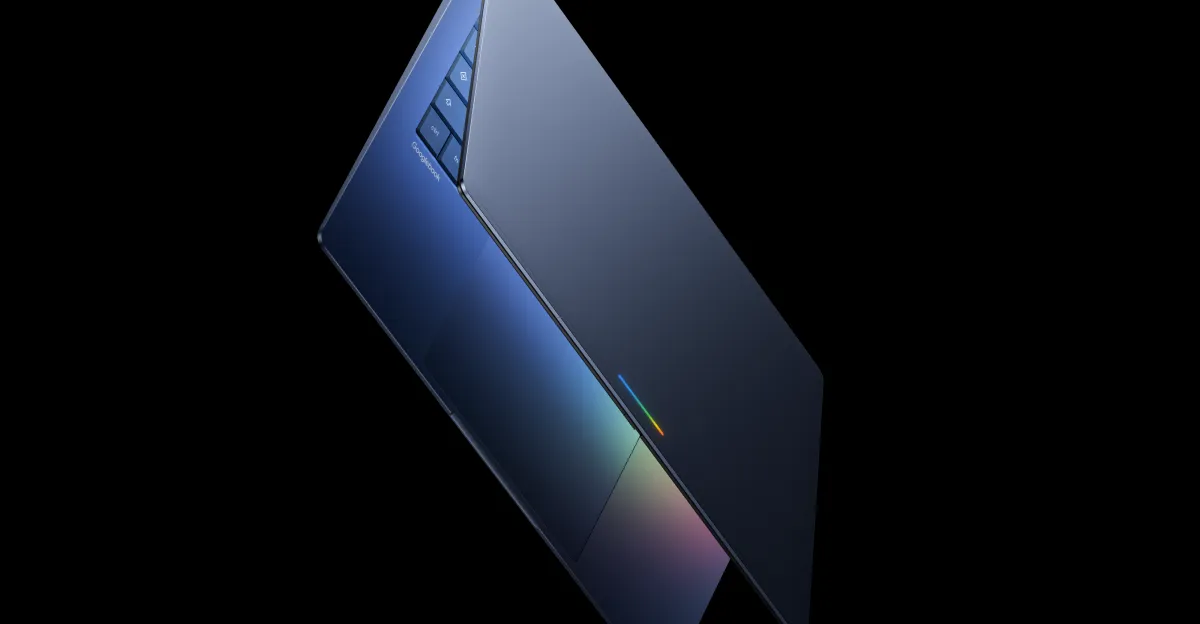
- The Googlebook is Google’s newly announced laptop platform (launching Fall 2026) designed as a Chromebook successor.
- It runs a unique OS based on a fusion of Android and ChromeOS, replacing the previous codename "Aluminium OS."
- Key features include the Magic Pointer (AI-powered contextual cursor), seamless file access between phones and laptops, and deep Gemini AI integration.
- Google has confirmed Chromebooks will continue to receive support, meaning current devices aren't being immediately phased out.
- The first Googlebook models will be manufactured by Acer, Asus, Dell, HP, and Lenovo, featuring a signature RGB glowing bar.
🎯 Introduction
Google is fundamentally shifting its laptop strategy with the Googlebook. As the Googlebook successor to the established Chromebook, this new hardware platform introduces a "fusion" operating system merging the best of Android apps with the web-centric ChromeOS infrastructure. This isn't just a hardware refresh; it is Google’s overture to dominate the productivity space by eliminating the friction between your phone and your laptop. For developers and power users, this pivot addresses a long-standing pain point: the fragmentation of ecosystems. By unifying the Android tech stack with laptop capabilities, Google aims to deliver a fluid, app-centric experience that feels like an extension of your mobile life.
🧠 Core Explanation
For a long time, Google’s laptop vision was split between the web-based ChromeOS and the app-based Android. The new Googlebook attempts to bridge that gap permanently. Instead of running Android apps in a virtual machine or using the Chrome browser to do everything, the new Googlebook runs a true hybrid OS stack. It allows you to launch native Android applications directly on the desktop alongside standard browser tabs.
This shift is significant. It suggests Google is moving away from a "web-first" OS philosophy toward an "app-first" OS that competes directly with modern Windows and macOS machines. The immediate implication for the ecosystem is a rethinking of how developers deploy software. If the Googlebook becomes a dominant production workhorse for developers, porting Android apps to desktop screens becomes a standard requirement for any rapid-iteration tool.
🔥 Contrarian Insight
"Calling it a new 'Operating System' is marketing spin; this is really just ChromeOS adopted to run the Android application container natively and uncontextualized."
While Google wants us to believe they’ve built something revolutionary with this "Fusion" OS, the reality is likely a consolidation of their weakest link. ChromeOS was great for light tasks but struggled with deep-OS functionality, while Android dominated the app space but had poor productivity tools. By blending them, Google is essentially admitting neither was perfect alone. This move feels like a defensive play to stop Windows users from fleeing to Apple, rather than a genuine innovation in productivity design. Relying on the "magic" of a floating cursor to drive hardware sales is a risky pivot; software must stand on its own merits.
🔍 Deep Dive / Details
The 'Aluminium' Codename Reveal
We must clarify a major point that tech enthusiasts have been tracking. The operating system often referred to as "Aluminium OS" is a code name. Google explicitly confirmed that the real branding is still TBD and that Aluminium is not the final name. This suggests the project is in a volatile state and may have been revised repeatedly. For developers, this implies the API and developer tools for this OS won't be final until late 2026.
The Magic Pointer: Beyond AI gimmicks
The standout feature is the Magic Pointer, an AI overlay for the mouse cursor.
- How it works: You shake your cursor or wave your hand, and the AI analyzes what's under the pointer.
- Use case: Pointing at a date in an email and asking the AI "Make a meeting," or pointing at furniture in a room photo and seeing it in layout. The Technical Take: For a developer, this moves computing from "input-based" (clicking buttons) to "intent-based" (what do I want to do here?). It requires heavy on-device inference for latency-free performance.
Ecosystem Continuity
A major selling point is the ability to bridge the phone-laptop gap.
- Direct File Access: You can open files on your phone and see them on your Googlebook without moving data manually.
- App Offloading: You can keep apps running on your phone but control them with the laptop keyboard and mouse.
Hardware Partnerships
Google is not building this alone. The "mysterious render" showed a laptop with a glowing RGB strip—a bold aesthetic choice—designed to signal it is a Googlebook. The hardware will be manufactured by OEMs like Acer, Asus, Dell, HP, and Lenovo. This is a smart move to leverage existing manufacturing supply chains but raises questions about how much first-party hardware Google (Pixel hardware) will actually release.
⚔️ Googlebook vs. The Competition
| Feature | Googlebook (Fusion OS) | Current Chromebook | Windows 11 / Surface |
|---|---|---|---|
| Architecture | Android Tech Stack + Browser | Web Browser + Linux (Beta) | Native Kernel |
| App Integration | Deep Android App Support (Desktop) | Android App Support (Fragmented) | Native Windows Apps |
| AI Integration | Cursor-based (Gemini) | Limited | Copilot (Search-based) |
| Updates | Estimated 10 years (Projected) | 10 Years (EU) | Active Support Installment |
| Development | Java/Kotlin (Android) primarily | Web/Node/Frontend | Full native stack |
🧑💻 Practical Value for Developers
What You Can Build
If you are a mobile developer, the Googlebook represents a massive opportunity. You can now build for a physical desktop form factor with a keyboard and mouse using your existing Kotlin or Java Android codebase.
- Benefit: No need to create separate UI layouts for landscape/keyboard interactions. The Android UI system scales well with resizeable windows.
The "Magic Pointer" API
While the hardware is proprietary, the API for the Magic Pointer will likely be open to developers. You can create modules that trigger when the AI system detects specific visual patterns (e.g., "When the cursor hovers over a PNG image, suggest generated variations").
Action Item
If you are a mobile developer, prepare your apps for landscape mode immediately. As of now, Android devices landlocked in portrait mode are at a disadvantage on laptops. Test your apps' resizing behavior or variables like isTablet to ensure they look massive on a 16-inch screen rather than focused and usable.
🔗 Related Topics
- [How to build Linux apps for Chromebooks today](https://bitai.dev/tutorial/building-apps-for-chromebooks/>
- [The future of AI assistants beyond ChatGPT](https://bitai.dev/tech-news/the-future-of-ai-agents/>
- [Developing for foldable phones and tablets](https://bitai.dev/mobile-development/making-apps-fit-any-size/>
- [Top open-source desktop alternatives to ChromeOS](https://bitai.dev/linux/hardware/top-linux-distributions/>
⚡ Key Takeaways
- The Googlebook is officially Google’s new laptop platform launching in Fall 2026, designed to succeed the Chromebook on the hardware side.
- It runs a unique fusion OS, blending the Android tech stack with a web browser, powered by Gemini AI.
- The Magic Pointer feature uses AI to analyze what you are pointing at to suggest actions, UI adjustments, or contextual information.
- Chromebooks are not dying; Google confirmed that current hardware will continue to receive support through their standard lifecycle dates.
- First-party models will be made by partners like Dell, HP, and Lenovo, signaling a shift away from exclusive first-party hardware.
🔮 Future Scope
We can expect leaks regarding the specific silicon under the hood very soon. Given the need for on-device AI processing for features like Magic Pointer, we will likely see Google relying heavily on AI-optimized chips (like the Snapdragon X Elite) rather than traditional Intel/AMD x86 chips. For the developer community, the most significant coming months will be the official SDK release for the "Fusion OS," which will likely happen right before the Fall launch.
❓ FAQ
Q: Is the Googlebook replacing the Chromebook? A: Not exactly. Google confirmed that new Chromebooks will continue to be released, and current devices will still receive their promised 10 years of security updates. The Googlebook is a new premium line launching "in the fall."
Q: What is Aluminium OS? A: Aluminium OS is the codename for the project, but Google clarified it is not the official name of the operating system. The real branding is still being worked on.
Q: Can I run my existing Android apps on the Googlebook? A: Yes. The post explicitly states that Googlebooks will run Chrome for web browsing, Android apps, and allow for direct access to phone files.
Q: What is the Magic Pointer? A: It is an AI overlay for the cursor in Googlebooks. It offers contextual suggestions, such as organizing dates into meetings or visualizing furniture in a room, based on what you are pointing at on the screen.
Q: Who is making the Googlebook hardware? A: Google is working with major manufacturers Acer, Asus, Dell, HP, and Lenovo to build the first models.
🎯 Conclusion
Google has made a bold statement with the announcement of the Googlebook. By attempting to fuse the power of Android with the productivity of ChromeOS, they are answering the question of "which OS is better?" with "why should we have to choose?" While questions remain about the hardware specs and the ultimate OS branding, the vision is clear: Google wants to own the app-centric productivity space. For developers, the shift towards Android-on-desktop capability means the conceptual divide between mobile and desktop development is about to get a lot thinner.
Stay tuned to BitAI as we track the SDK release for the new Fusion OS and reveal what this means for your coding workflow.
Share This Bit