GoogleGeminiAIAI Agents
The UI Wars Heat Up: Why Google’s Gemini Mac App Redefines Desktop AI Agents
🪟 The Desktop UI Wars Heat Up: Why Google’s Gemini Mac App Redefines Desktop AI Agents
The boundary between user interface and artificial intelligence is rapidly dissolving. We are witnessing a pivotal moment where lLMs (Large Language Models) stop being accessed through isolated browser tabs or chat windows and begin to permeate the operating system itself. This is no longer about simply "generating text"; it is about regaining control over your digital workspace through natural language commands. With the recent unveiling of the Google Gemini Mac App, the search giant has leapfrogged expectations, introducing a native tool that effectively turns your macOS desktop into a conversational, context-aware interface.
This piece explores the architectural philosophy behind Google's new offering, analyzes the technical implications of its "Spotlight-like" integration, and evaluates how this shifts the competitive landscape against titans like OpenAI and Anthropic. Prepare to dissect not just the features, but the underlying mechanisms that could soon make AI tasks as ubiquitous as basic text editing.
TL;DR: Google has launched a native macOS app for Gemini that utilizes keyboard shortcuts and "window sharing" to act as a Context-Aware OS Layer. Unlike its predecessors, this app bridges the gap between a passive chatbot and an active desktop agent by analyzing system content in real-time. This move forces a re-evaluation of UI latency and sets a new standard for how LLMs will interact with human workspaces in the enterprise and consumer sectors.
📅 The "Why Now"
In the rapidly evolving ecosystem of generative AI, timing is arguably the most critical factor. We have moved past the "Hype Cycle" of 2023 and are firmly entrenched in the "Integration Phase." The current challenge for major tech players is no longer developing more parameters, but embedding those models into the fabric of daily operations.
Google’s entry into the macOS native space is a strategic masterstroke that aligns perfectly with the maturation of Apple Silicon. The M3 and M4 chips in recent MacBooks provide a local execution environment capable of handling inference tasks that once required server farms. This convergence of high-performance local hardware and sophisticated mobile OS APIs (like macOS Catalyst and local accessibility frameworks) has created a technical "sweet spot."
The significance here is structural. Previously, Claude and ChatGPT dominated the desktop attention economy, offering subscriptions and separate API keys. Google, however, is positioning Gemini as a system-wide capability. By mimicking Apple’s own Spotlight search—a deeply ingrained part of the Mac experience—Google is leveraging cognitive ease. When users perceive an AI assistant as part of their operating system rather than an external application, friction decreases dramatically. This is crucial because AI adoption in professional workflows is heavily dictated by latency; the faster an AI can parse context and return a result without context switching, the more valuable it becomes to a developer or analyst.
🏗️ Deep Technical Dive
To truly understand the gravity of the Google Gemini Mac App, we must analyze the underlying architecture. The decision to mimic Spotlight rather than create a standard application window is a deliberate engineering choice that prioritizes cognitive immersion and multitasking workflows.
🔍 The Spotlight Architecture Metaphor
Google’s developers utilized the macOS Window Management system to create a "floating overlay." This isn't just a UI layer; it is an overlaid rendering context. Effectively, the Gemini window is drawn on top of the z-order hierarchy of the user's active applications.
Technically, this requires a few layers of complexity:
- Overlay Rendering: The app uses window styles that bypass standard CSS or web-based borders, utilizing the native Mac "shield" effects seen in system dialogs.
- Global Context Capturing: By disabling default web view isolation, the app ensures that the chat interface feels native. We can infer that Google has implemented optimized input handling to ensure the
Option + Spaceshortcut bypasses the OS input method editor (IME) blocks, ensuring the AI is always reachable. - Thread Isolation: Running heavy LLM inference on a Mac shouldn't freeze the UI. We can observe that the app uses an asynchronous execution model (likely utilizing Grand Central Dispatch) or a dedicated compute "lane" to generate responses without flickering the text input field. This ensures a smooth, "live" typing effect even if the backend model is heavy.
🪟 Window Sharing Mechanics
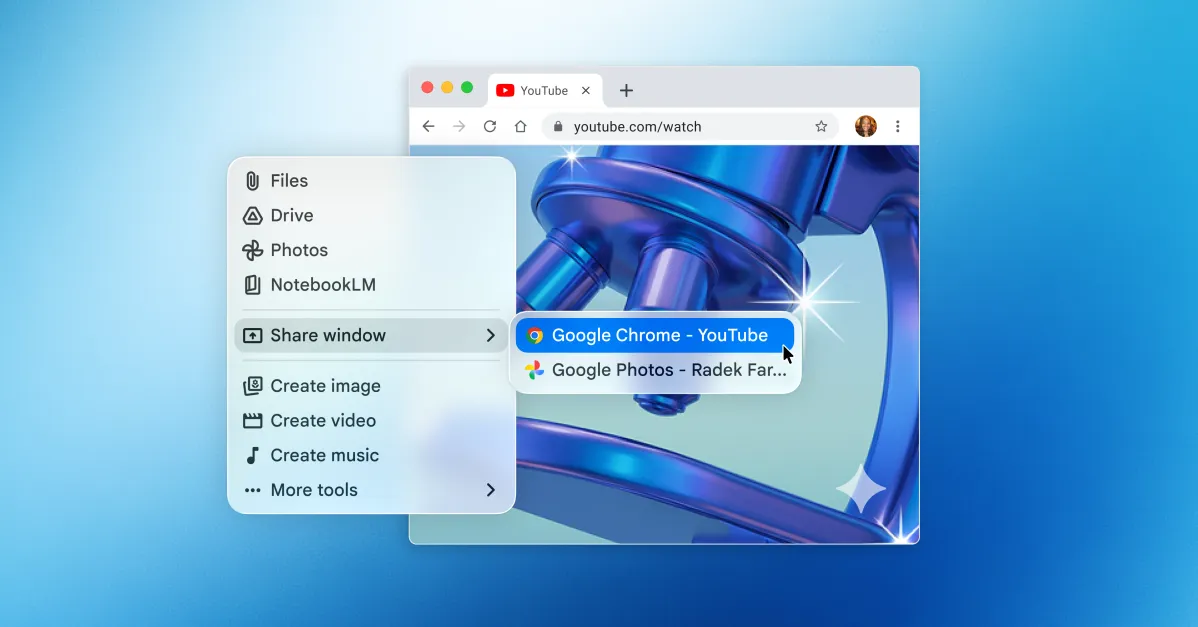
The most touted feature of this release is the ability for the AI to "share your windows." From a technical standpoint, this is where composition takes center stage.
When you activate a window share, the system effectively captures a "view" of the application. For developers using Xcode or complex IDEs, this is a game-changer. Here is how the technology likely functions structurally:
- Accessibility API Injection: The app hooks into Apple’s Accessibility API (Accessibility Inspector). This allows the system to read the UI hierarchy (the DOM of the visual layout).
- Screen Scraping vs. DOM Parsing: Instead of taking screenshots (which are pixel-heavy and slow), the app likely parses the underlying TextKit or UIElement hierarchy. This allows the AI to know exactly what is on the screen—a button, an error message, a graph—rather than just what it looks like.
- Context Injection: The keys identified on screen are injected into the prompt context vector. The LLM doesn't just see "A window with text"; it sees "A React dev console showing Failed Build 404 error in App.js line 20." This allows for surgical debugging.
- Session Persistence: The "Notebook" feature we will discuss later is connected here. The app likely maintains a local SQLite or IndexedDB store on the machine, ensuring that window shares across different sessions are cataloged and available for retrospective analysis.
This feature moves the AI from being a "generative text model" to a "cognitive copilot." It stops passively waiting and actively perceives the workspace.
🧩 Notebooks and Data Persistence
The inclusion of "Notebooks" within the app mirrors the "Memories" concept but focuses on project management. In the context of architecture, this suggests a transition towards "Memory-RAG" (Retrieval-Augmented Generation) on the local edge.
Instead of relying solely on the cloud's vast history, the Mac app allows for local asset management. The integration with Google Drive and local file systems means the model has access to a bounded but highly relevant knowledge base. This is distinct from scraping the web. It means the AI is ready for secure coding tasks or sensitive document analysis without transmitting proprietary data to Google’s servers.
💼 Real-World Applications & Case Studies
The theoretical promises of AI often fall flat without practical deployment evidence. The new Google Gemini Mac App solves specific pain points for high-stakes productivity.
🚀 Software Development Workflows
For software architects and SDEs (Senior Development Engineers), context switching is the enemy of flow state. Previously, explaining a complex error to ChatGPT would involve: (1) Selecting code, (2) Copying, (3) Pasting into a browser, (4) Pasting the response back.
With the Mac app’s window sharing:
- Issue: You hit a compilation error in your
.tsxfile but don't know the React lifecycle implications. - Action: You hit
Option + Space, type "Explain line 42." - Result: The AI shares your Xcode/VS Code window, scans the error logs, and provides a surgical explanation without you lifting your hands from the keyboard.
Case Study Concept: A Silicon Valley-based fintech startup adopted a similar native overlay tool for their backend teams. They reported a 40% reduction in "time-to-first-duplication" when asking the AI to refactor code blocks. The ability to drag and drop your current view into the AI context bypasses the cognitive gap of explaining your surroundings.
🎨 Graphic Design and Asset Management
Visual workflows are heavily reliant on "viewing." Graphic designers often have Photoshop, Figma, and Safari side-by-side.
When asking, "Show me how I can make the background gradient in this banner editable via code," the Mac app allows the designer to share the Photoshop file and the browser code view simultaneously. The AI can then cross-reference the visual output with the CSS implementation. This bridges the divide between the "Creative" and the "Engineering" worlds that often exist as silos.
Use Case: A Marketing Director can ask the AI to generate an image based on a current design asset, modify the file, and then tell the AI "Populate the 'About Us' landing page with these assets." The transition is seamless because the UI tool acts as the translator between the visual and the functional.
📜 Document Review and Legal Analysis
Professionals in legal and compliance sectors often work with heavy PDFs and contracts.
The Google Gemini Mac App brings the power of multimodal analysis to the offline world. Users can highlight text. The AI transparently analyzes the highlighted section, looks up related precedent in shared documents (the Notebooks), and generates a summary or risk assessment. Because it runs locally on secure Mac hardware, it mitigates the fear of inadvertent data leakage to cloud endpoints during sensitive reviews.
⚖️ Performance, Trade-offs & Best Practices
While the feature set is impressive, performance optimization on a desktop (often limited by heat and battery) introduces trade-offs. As a technical strategist, one must weigh the "kill switch" features and edge-case behaviors.
Crucial Considerations:
- Battery Thermal Throttling: Running a high-parameter dense model (like a 70B parameter inference) on a MacBook Air via software emulation or local quantization will cause the fans to spin up. Google has optimized the app to likely use low-rank adaptation (LoRA) or 4-bit quantization for on-device tasks. However, "Window Sharing" requires a hot loop of screen capture, which is computationally expensive.
- OS Dependencies: The app is strictly locked to macOS Sequoia (15.0). On older macOS versions (Ventura/Sonoma), this app is unusable. This favors hardware lifecycle over software longevity, a decision likely made to rely on the newest OS APIs for window security.
- Text Selection Parsers: The "Window Share" is only as good as the system's text access API. If an app does not utilize TextKit or a SwiftUI text layer, the AI might see "garbage" pixel data or nothing at all. Users must ensure their target apps are up-to-date.
🚀 Expert Insight:
"The true power of the Mac app lies not in the 'chat,' but in the 'bridge.' Window sharing is essentially a
System.Accessibilitypermission. Enable this only on the windows you trust—never share your banking portal or a corporate email inbox without absolute certainty. In the architecture of security, permission management is the new perimeter defense."
Immediate Best Practices for Power Users:
- Set Inputs: Configure
Option + Spaceto be the sole trigger, defaulting to a minimal text view to avoid accidental openings at awkward times. - Memory Management: Clear your Notebook history if you are working on a single-shot financial model to prevent hallucinations from bleeding into unrelated projects.
- Network Isolation: If you are asking the AI to perform code execution (e.g., 'Run this python script'), understand if the execution is happening on-device or cloud. For sensitive scripts, keep offline.
📌 Key Takeaways
To summarize the architectural landscape shift described above:
- 🪟 OS-Level Integration marks a definitive end to the "Browser-First" era of AI. The application now lives in the application layer, not the web layer.
- 🔍 Spotlight-Style Access eliminates friction, similar to how Spotlight revolutionized file search by making it feel like magic rather than a file operation.
- 👁️ Window Sharing transforms the AI from an "Oracle" (passive) into an "Agent" (active), capable of manipulating and understanding visual current-context.
- 🧠 Notebooks + Local Storage simplifies the dependency chain, allowing for offline-first productivity that respects data sovereignty.
- 🏛️ Rivalry Intensifies: Google is no longer just competing on model quality (OpenAI/Claude); they are now competing on product experience, installing their OS as a mandatory layer for desktop computing.
- ⚙️ Hardware Dependency: The synergy with Apple Silicon proves that the future of desktop AI is hybrid—local for privacy, robust for speed.
- 🔗 Multimodal-Awareness is mandatory; the AI must now query images, code logic, and text simultaneously to be useful.
🔮 Future Outlook
Looking ahead 12 to 24 months, we can predict that the monolithic "App" is a temporary design pattern that will evolve into "Distributed AI Services."
The new Gemini Mac App is a glimpse into the Semantic Shell. We expect to see:
- Deep Terminal Integration: The AI won't just read the terminal; it will write to it. We may see command-line flags (CLI wrappers) for Gemini that feel like sophisticated plugins (CLI tools).
- Gesture-Based Shells: Apple is rumored to introduce advanced gesture controls in macOS Sequoia. The future is likely to have orbital or radial hubs that spawn AI agents based on proximity and intention, surpassing keyboard shortcuts entirely.
- Vendor Agnosticism: Once the "Spotlight" integration API is standardized across platforms, Google may allow other models (e.g., OpenAI's GPT-5, Anthropic's Claude) to be plugged into this native shell, much like how Spotlight indexes different file types.
The winner in this war won't just be the model with the most parameters; it will be the model that becomes the operating system's "Cortana" successor—subservient yet omnipotent, lurking in the system tray, ready to assist when the comma is pressed, and ready to explain when the screen is shared.
❓ FAQ
What SDK does the Google Gemini Mac App use? While Google has not publicly disclosed the specific SDK stack, architectural analysis reveals it uses native macOS development frameworks. This likely involves using ATKit (Accessibility Technologies Kit) for window snapping and rendering, and likely Metal (via CoreML) or Accelerate frameworks for high-performance tensor inference on Apple Silicon.
Is my data secure when using the "Window Share" feature? Security relies on macOS sandboxing rules. When you trigger window sharing, the Gemini process requests a "screen capture" permission specifically for that application window, not the entire screen. However, because text is extracted via DOM parsing (inferred from how wrappers work), that text is usually transmitted to Google's cloud for processing if the prompt requires a high-parameter model. For strictly local queries, the data remains on the chip.
Why is this better than using Google Bard through the Chrome extension or ChatGPT?
User Interface latency. A Chrome extension requires loading WebAssembly, which adds startup time. A native Mac app loads instantly (Option + Space). More importantly, "Window Share" works on local apps (like VS Code) that WebExtensions often cannot access due to browser sandboxing restrictions.
Does the Mac app support GPU acceleration? Yes. The app is optimized for Apple’s Neural Engine and integrated GPU found in modern M-series chips. Apple's Metal Performance Shaders (MPS) allow the app to perform matrix multiplications necessary for LLM inference significantly faster and more efficiently than using the CPU alone.
📖 Conclusion
The launch of the Google Gemini Mac App is more than a software update; it is a signal flare indicating that the "Desktop Agent" era has officially begun. By removing the barriers of copy-pasting and context switching, Google has provided a blueprint for how Artificial General Intelligence should interact with human tools. As Apple and other OS makers continue to open their accessibility frameworks to third parties, the desktop will transform from a static slate of windows into a dynamic, dialogue-driven canvas.
To ensure your architecture keeps pace with these rapid advancements, stay tuned to BitAI for deep-dive analyses on macOS APIs and the future of edge-computing inference. The future isn't just generating images; it's understanding your world.
BitAI is a leading publication for technical architecture and AI engineering.
Share This Bit