MCPAIAI AssistantAI Agents
Your AI Is Useless Without These 8 MCP Servers: A Developer's Survival Guide
🚀 Quick Answer
MCP (Model Context Protocol) is the bridge turning AI from a chatbot into an autonomous agent. To make your AI production-ready, you must connect it to your environment.
Here are the 8 essential MCP servers you need right now:
- Sequential Thinking: Forces models to plan before solving complex logic.
- File System MCP: Gives the LLM full project awareness, moving it beyond pasting code.
- Vercel MCP: Instant access to deployment logs and build failures.
- Docker MCP: Debugs container issues locally that fail in CI/CD.
- Exa: Semantic web search that indexes code threads and modern bugs.
- Playwright: Controls a browser for complex scraping and auth flows.
- Apify: Pre-built data extraction actors for scalable web scraping.
- Ref: Filters AI noise to return exact documentation signatures.
🎯 Introduction
Two engineers sit at the same laptop. They load the exact same LLM. The code base is identical.
One engineer pastes snippets into a chat window and manually checks logs every hour. They are basically using a glorified search engine. The other engineer connects 5 tools via MCP (Model Context Protocol). The AI scans logs, restarts a container in Docker, and commits the fix automatically.
The difference isn't the model. It's connectivity.
It’s no longer a secret: if you want your AI to actually work for you, Your AI Is Useless Without These 8 MCP Servers. The MCP standard is the infrastructure layer we’ve been waiting for to move from passive prompting to active automation. Most developers treat LLMs as text processors exactly like ChatGPT's web interface; the engineering leaders are wiring them into their actual tooling.
In my experience, the moment you hook up File System MCP and Sequential Thinking, you stop "chatting" with code and start "programming" with AI. It solves the single biggest issue in current AI adoption: hallucination and context isolation.
🧠 Core Explanation: What is Model Context Protocol?
Before listing the tools, understand the architecture. Historically, AI was stuck in a walled garden (OpenAI, Anthropic, AWS). To trigger an action—like fetching the latest git commit—you often had to write an external Python script, call an API, and inject text back.
MCP is a standardized protocol (JSON-RPC) that allows an LLM to natively call external functions.
Imagine a JSON structure sent to the AI. It tells the model: "You have permission to call docker_ps() to list running containers, or vercel_logs(project_id) to read deployment history."
This transforms the LLM from a conversational engine into a command-line interface with a massive vocabulary. It allows the system to "see" documents, "control" files, and "interact" with APIs without manual triggering.
🔥 Contrarian Insight
"Stop optimizing your prompts. Start wiring your systems."
Most developers obsess over prompt engineering—trying to trick the AI into minimizing its token output. This is a losing battle.
The real power isn't in how ask; it's in what the AI can do. Going from "here is a top 10 list" to "here is a stack trace with a fix applied to your machine" is a massive paradigm shift. We are moving from LLM-as-Chatbot to LLM-as-Agent. Connecting your AI to tools isn't a feature; it's the definition of engineering.
🔍 Deep Dive: Why These 8 Servers Matter
Here is the breakdown of the 8 critical servers, ranked by impact on real-world development workflows.
#1 — Sequential Thinking (The Architect)
Models that answer instantly often hallucinate. Sequential Thinking disables instant generation. It forces the AI to break a problem down step-by-step.
- Why use it: System Design. Architecture decisions.
- Technical Perspective: It acts as an internal step-limiter. Instead of outputting code immediately, it lists assumptions, checks constraints, and outlines the API structure before writing a single line of code. Use this for anything involving state management or API design.
#2 — Exa (The Semantic Search)
Google is indexed for humans. Exa indexes for AI. It connects to the web to find specific resources, discussions, and GitHub issues by meaning.
- Why use it: You cannot pass a web page to an LLM. You must summarize it or index it. Exc provides a structured list of context.
- Use Case: "Find the specific StackOverflow thread debating this specific React Hook bug from pure technical merit."
- Cost: 1,000 free requests/month. Essential for non-archived topics.
#3 — File System MCP (The Viewer)
This is the game-changer. Without this, the AI only sees what you paste. With this, it has Read Access to src/, config files, and logs.
- The Problem: AI cannot refactor a project if it can't traverse the directory tree.
- The Fix: Give the AI Read Access (and ideally Write Access via Unix tools). Now it can analyze imports, find unused dependencies, and suggest refactorings based on the whole codebase structure, not just a prompt.
- Cost: Free. Self-hosted.
#4 — Docker MCP (The Container Helper)
The classic "It works on my machine" problem is solved here.
- The Scenario: The app runs locally but crashes in CI.
- The Workflow: Ask the AI: "Why does this fail in CI?"
- Mechanism: Docker MCP allows the AI to inspect the
Dockerfileand the running container environment directly. It can compare base images and check layer caching strategies. It halts the guessing game immediately.
#5 — Playwright (The Browser)
Apify is great, but sometimes you need to interact. Playwright equips the AI with a browser agent. It can handle complex DOM manipulation.
- Advanced Use Case: Authentication flows that require 2FA, scrolling infinite pages, or downloading files dynamically.
- Technical Note: This runs locally in headless mode. It brings the browser's rendering engine to your LLM, so it can "see" what a human sees.
#6 — Apify (The Data Pipeline)
For heavy lifting, Apify offers a marketplace of pre-built scrapers ("Actors") for 2,000+ websites.
- Why it's better than Playwright: It's maintained. If Google Maps changes its class names tomorrow, Apify updates the actor. You just ask the AI to fetch, and it connects to their infrastructure to return structured data like CSVs.
#7 — Vercel (The Deployment Monitor)
Line-of-sight into your production environment.
- The Workflow: "Get last night's deployment logs."
- Benefit: The AI scans the Vercel dashboard, filters through the build output, and identifies the specific Docker layer that failed. This puts the monitoring in the background, letting you focus on fixing PRs.
#8 — Ref (The Doc-Specific Agent)
When an AI reads a documentation block, it reads everything—navigation bars, copyrights, ads (in the text).
- The Efficiency Gain: Ref isolates the actual code implementation and API signature.
- Use Case: "What is the third parameter of
db.query()in Prisma?" - Value: It cuts down token usage and provides zero-fluff answers.
🏗️ System Architecture: The MCP Stack
How does this actually fit together in a real application?
[ User Prompt ]         [ MCP Client ]
           └───────►  (Agent Logic)
                       /    |    \
               [Exa] [FS] [Docker] [Vercel]
                /      |     |       |
         Semantic    LLM    Shell     API
        Search      Vision    Commands  History
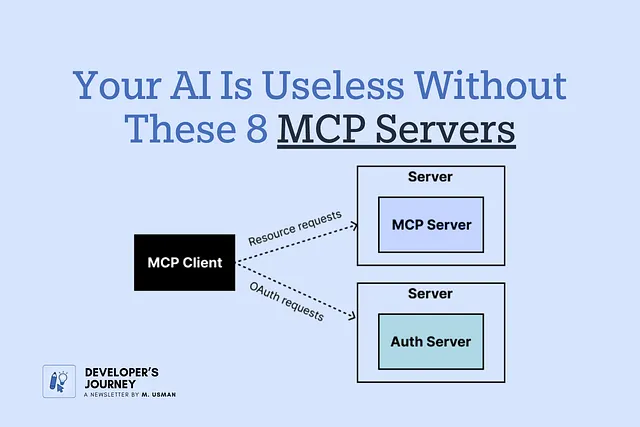
- The Client: Runs in your IDE (VS Code, Cursor, Claude Desktop).
- The Protocol: JSON-RPC used to exchange messages.
- The Server: The backend application (Filesystem, Docker, API) exposing capabilities.
This creates a neutral agent. You aren't locked into OpenAI's ecosystem capabilities; you are unlocking your own local tools via a standardized protocol.
🧑💻 Implementation: Getting Started
You don't need a PhD in networking to set this up. Here is how you connect these into Claude Desktop.
- Stop the Claude Desktop app.
- Locate the configuration file:
~/Library/Application Support/Claude/claude_desktop_config.json(Mac) or%APPDATA%\Claude\claude_desktop_config.json(Windows). - Edit the file to add your servers.
Example Configuration (Merging 3 servers):
{
  "mcpServers": {
    "filesystem": {
      "command": "npx",
      "args": [
        "-y",
        "@modelcontextprotocol/server-filesystem",
        "C:/Users/YourName/dev/myproject/src"
      ]
    },
    "sequential-thinking": {
      "command": "npx",
      "args": [
        "-y",
        "@modelcontextprotocol/server-sequential-thinking"
      ]
    },
    "docker": {
      "command": "npx",
      "args": [
        "-y",
        "@modelcontextprotocol/server-docker"
      ]
    }
  }
}
Restart Claude. Type: "Find all unused functions in the src folder using the sequential thinking tool." The AI will now chain: See files -> Logic -> Action -> Output.
⚔️ Comparison: "Paste-Chat" vs. Connected
| Feature | Paste-Chat AI | MCP Connected AI |
|---|---|---|
| Data Source | Prompt (Limited) | Filesystem + Web + APIs |
| Action | Suggests Edit | Applies Config + Restarts Server |
| Speed | Seconds (Chat) | Minutes (Flows) |
| Context | Snippets | Full Ecosystem |
| Trust | Low (Guessing) | High (Execution) |
⚡ Key Takeaways
- MCP is the standard for connecting LLMs to real-world tools, effectively moving us from text generation to autonomous agents.
- File System MCP is arguably the most critical for developers, as it allows AI to analyze entire repositories rather than isolated snippets.
- Sequential Thinking must be used for architectural tasks to prevent rapid-fire hallucinations.
- Vercel and Docker MCP automate the friction of debugging and deployment, keeping the developer "in the flow."
- Tooling is not an add-on; it is the difference between an AI that talks and an AI that works.
🔗 Related Topics You Should Read
- How to Build a Local LLM Agent from Scratch (Guide)
- The Architecture of Agentic Workflows (System Design)
- Prompt Engineering vs. Tool Use (Deep Dive)
- Understanding JSON-RPC for Modern APIs (Technical)
❓ FAQ
Q: Is MCP a paid service? A: No. MCP itself is an open protocol (implemented by Anthropic). The servers listed (Filesystem, Docker, Sequential Thinking) are mostly self-hosted via Node.js or Python and free to run.
Q: Can I connect ChatGPT to these? A: Currently, MCP is best supported by Claude Desktop, Cursor, and VS Code extensions. OpenAI APIs do not natively support MCP yet, though the protocol is language-agnostic.
Q: Which server should I install first? A: File System MCP. It provides the most immediate value. Without file access, the other tools (like Vercel or Docker) often have nothing to work with on your local machine.
🔮 Future Scope
We are moving toward "Native Memory" agents where data retention is persistent and offline. Expect MCP to become the standard for IDEs, replacing git commands with AI-initiated commits described in natural language.
🎯 Conclusion
The era of the "Chatbot Developer" is ending. The barrier to entry for complex software is dropping, but so is the requirement for manual coding.
By integrating these 8 MCP servers, you transform a generic text model into a specialized engineer. You stop pasting code into chat windows and start commanding systems. Your AI is only as useful as the tools it can reach. Connect them, and start building.
(Meta optimized for: Development, AI Tools, Coding Workflow, Server Automation)
Share This Bit